We use cookies to provide our visitors with an optimal site experience. View our privacy notice and cookie notice to learn more about how we use cookies and how to manage your settings. By proceeding on our website you consent to the use of cookies.
I need to connect the arduino mega board on my PCB, will DigiKey provide me with the arduino mega dev-board and headers seperately so that I can solder the female headers on the bottom side of my arduino mega dev board, otherwise How will mount the arduino mega on my PCB?
The Arduino MEGA2560 (A000067) only comes with headers already attached. The standard Arduino boards are typically designed with the assumption that one would add daughterboards on top of the Arduino board rather than place an Arduino board on top of a base PCB. If you need to specifically use the Arduino form-factor with the ATMega2560 microcontroller, then your options are fairly limited. You could try either of the following:
De-solder the socket headers and re-solder them on the underside of the board.
Invert the Arduino board and plug it in upside down. (Note that some components, such as the USB connector are taller than the headers, so this would have to be accounted for, either by hanging over the edge of the base PCB or by inserting headers in between the base PCB socket and ATMEGA2560 board)
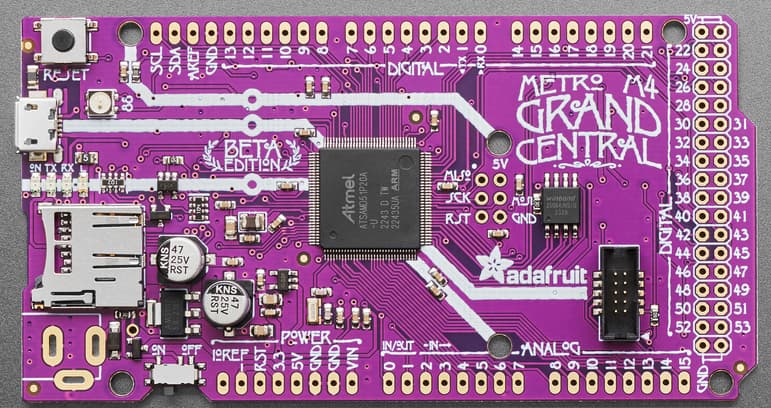
If you just need about that many I/O and still want to use the Arduino IDE, the 1528-2906-ND (Adafruit 4084) Metro M4 Grand Central might be worth considering.
It has the same form-factor as the Arduino MEGA2560 board, but with no headers attached. This board uses the ATSAMD51 ARM Cortex M4 MCU, so it runs much faster than the ATMega2560 is capable of running but it can still use the Arduino IDE or Circuit Python. One significant difference is that it runs on 3.3V rather than 5V, so anything interfacing with it must not use 5V.