


I’d like to enable the micro HDMI on BeagleBone Black for buildroot2. I’d tried a few git tags such as 2025.02.3 and 2024.08, and I’d tried a few default configurations such as beaglebone_defconfig and beaglebone_qt5_defconfig, and I could not get the shell displaying on HDMI monitor once the built sdcard.img programmed into micro SD card and the BeagleBone Black booted from that card.
Does anyone perform such things?
Buildroot, has had pretty good support for this board. Let’s check a few things, what revision is on your PCB? Please plug a USB serial adapter into j1 and share your boot log.
Regards
Hi,
My boot logs are in attached; where the log with -v1 suffix is booting from preprogrammed/unboxed debian image, and the log with -v2 suffix is booting from the buildroot2 sdcard.img.
Please kindly take a look and give me some advice. Thanks.
ubuntu-24-04-minicom-bbb-2025-08-05-v2.txt (16.8 KB)
ubuntu-24-04-minicom-bbb-2025-08-05-v1.txt (4.8 KB)
Yeap, V1 is the factory BeagleBoard.org image, which we have video working. I really see nothing wrong with v2 log (from buildroot), it loaded the drm sgx acceleration, move the mouse, it might be already in wayland with no cursor with a blank screen..
Regards,
Hi,
Sure; blank screen without cursor is shown on my HDMI monitor (for the BBB programmed buildroot2 sdcard.img). Now I’d like to know how to enable the display of BBB on a HDMI monitor, especially for GUI. Could you please give me some advice for buildroot2 on BBB? Thanks.
The Buildroot “qt” configuration, is not a regular x11 desktop. It’s actually setup to run your “qt5” application on launch.
if you add vlc to your package list, you should be able to run that on the screen:
./package/vlc/vlc.mk:VLC_DEPENDENCIES += qt5base qt5svg
(not that vlc will be able to do much with just the Cortex-A8)
Regards,
As a followup, bootlin (one of the buildroot developers) has a nice blog on building a qt application thru buildroot: Building a Linux system for the STM32MP1: enabling Qt5 for graphical applications – Bootlin
Regards,
Hi,
First of all, what I need is GUI working on an HDMI monitor regardless the GUI is developed based on QT5 or GTK+ or anything else.
I’d taken a glance at the article of bootlin which is written for STM32MP1 instead of AM335x (BBB), what driver(s)/packages should be enabled on AM335x? actually, I don’t know because I’m not familiar with this. Sorry.
Now I’ll have a trial on enabling vlc with extra dependencies, i.e. qt5base and qt5svg, that you’d mentioned here.
Thanks for your rapid advice.
Well, we ship a default Debian IOT image for BeagleBoard.org, you can install x11/etc and setup your desktop environment from that. It’s painfully slow, so i don’t bother generating an “official” xfce image for am335x anymore..
For example: BeagleBone Black Debian 12.11 2025-06-30 IoT-VSCode (v6.12.x) - BeagleBoard
In this case STM32MP1 vs AM335x does not matter, with the guide it’s more about setting up your qt5 application..
Regards,
Hi,
Alright; let me study the article of bootlin deeply.
By the way, I had a trial on enabling vlc with extra dependencies, i.e. qt5base and qt5svg, that you’d mentioned here; blank screen without cursor is still shown on my HDMI monitor, even I launched vlc on the terminal of serial console (might be an incorrect manipulation of mine). You may check the picture and log in attached.
I’ll get back once I have more thought. Thanks.
ubuntu-24-04-minicom-bbb-2025-08-06-v1.txt (18.3 KB)

Thanks for the photo, yes, so all we have is the kernel boot logo.. So there is nothing running to grab the screen.. Normally X11/wayland or qt5’s eglfs would have taken over…
Yeap, i guess we can only consider buildroot’s beaglebone_qt5_defconfig a basic starting point, no gui application is loaded by default..
Regards,
Hi,
After checked several sites, I’d confirmed beaglebone_qt5_defconfig is okay to display graphic; extra configuration is not needed during compilation time, but extra configuration is needed during run time; refer to readme.txt, it mentioned that:
export QT_QPA_EGLFS_KMS_CONFIG=/etc/qt5/eglfs_kms_cfg.json
export QT_QPA_PLATFORM=eglfs
export QT_QPA_EGLFS_INTEGRATION=none
/usr/lib/qt/examples/opengl/hellowindow/hellowindow
Once the compiled image is programmed into SD card and inserted into BBB, when the graphical program is launched, the graphic is shown on my HDMI monitor; here is an example (i.e. hellowindow).
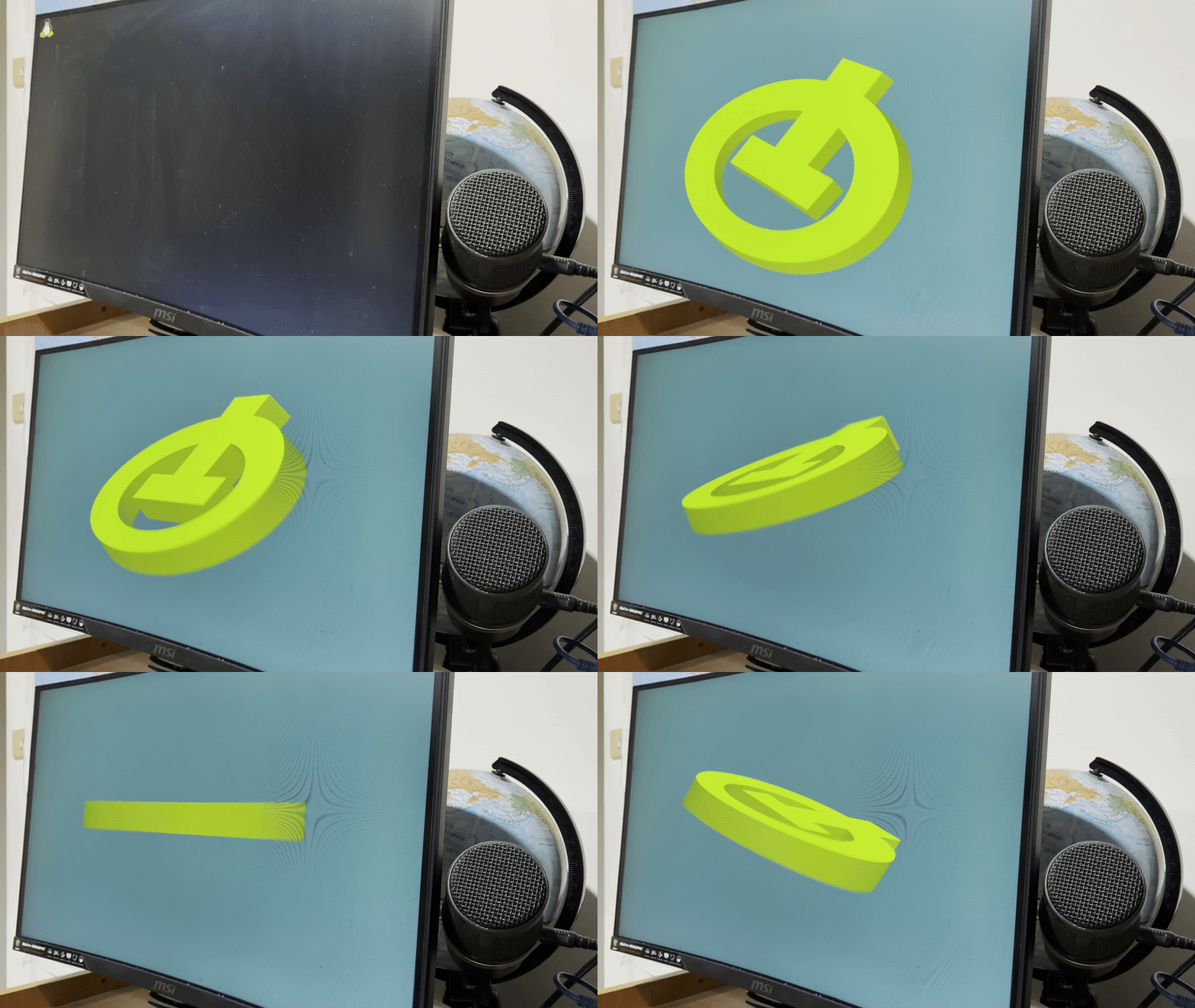
By the way, it seems like that neither toolkit/window manager/desktop environment nor wayland/Xorg is involved in beaglebone_qt5_defconfig.
Anyway, thanks for your help, @RobertCNelson.