


The DFM8001 is an ambient energy harvesting module designed to effectively collect and store environmental weak energy down to the microwatt level. By leveraging the power of natural resources, the DFM8001 eliminates the need for frequent battery replacements, reducing maintenance costs and environmental impact.
In our previous article, we have discussed the Energy Harvesting Kit and all its features. Now, in addition to this, here’s a step-by-step guide on how to get started with the DFM8001 Energy Harvesting Power Management Evaluation Board:
1. What You Need
Before getting started, make sure you have the following items ready:
- DFM8001 Energy Harvesting Module Evaluation Board x 1
- 0.22F Supercapacitor (included in the kit) x 1
- Amorphous silicon photovoltaic panel (included in the kit) x 1
- Multimeter/1.8V low-power load
2. Physical Setup
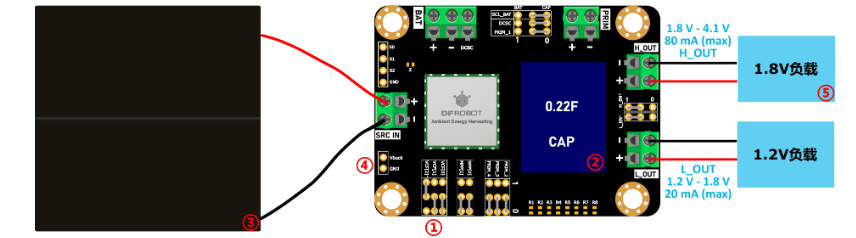
Step 1: Insert the 0.22F Supercapacitor
- Install the 0.22F super capacitor onto the board.
Before fully understanding all configurations, use the new 0.22F super capacitor provided in the kit. When using pre-charged capacitors or batteries, ensure the initial voltage of the capacitor is less than Voc.
Step 2: Connect the Amorphous Silicon Photovoltaic Panel
- Connect the amorphous silicon photovoltaic panel and ensure the front side of the panel is exposed to light.
- When connecting, pay attention and ensure the terminals of the evaluation board are in full contact with the metal part of the PV panel leads. Pressing in too much of the wire’s insulating jacket may cause connection failure.
3. Jumper Configuration
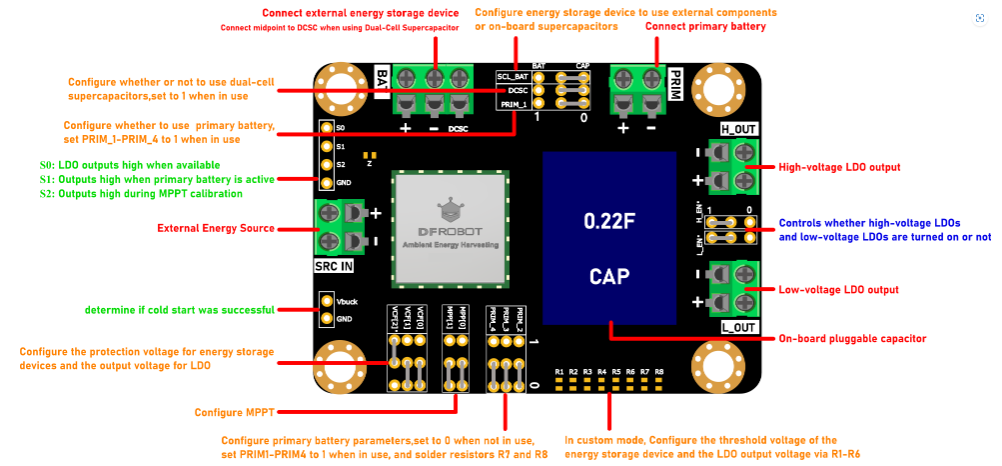
The jumper cap configurations are important to ensure that the module operates correctly. Initially, all jumper caps are in the default state. Here’s how to set them up:
- SCL_BAT: Set to CAP
- L_EN and H_EN: Set both to 1
- VCF[2]: Set to 1
- The remaining jumper caps should be set to 0.
Do not adjust jumper cap configurations without fully understanding all the module’s settings, as this risks damage to the device.
4. Power-Up and Operational Flow
- Energy Input Detection:
- Vsrc > 400mV & 15uW, the module wakes up.
When the voltage from the solar panel (Vsrc) exceeds 400mV and the power exceeds 15µW, the module “wakes up” and starts harvesting energy.
-
Charging Energy Storage:
The module charges the connected supercapacitor. Voltage on the capacitor (Vbat) will rise. -
LDO Output Activation:
- Vbat > Vcr, the LDO output is enabled.
Once Vbat reaches the charge ready voltage (Vcr, ~2.3V for the supercapacitor), the LDO regulators activate and provide output power.
- Overcharge Protection:
- Vbat > Voc, the module enters overcharge protection (charging stops; LDO continues).
When Vbat reaches overcharge voltage (Voc, typically ~4.2V for lithium battery, but lower for supercapacitor), charging stops to protect the storage device, but LDO output continues.
- Overdischarge Protection:
-
When Vbat ≤ Vod:
If PRIM is connected, the primary battery charges the storage until Vbat > Vcr.
If PRIM is not connected, LDO output shuts off after 600ms.If Vbat drops below overdischarge voltage (Vod), the module either switches to backup battery mode (if connected) or shuts down LDO output after ~600ms to protect the storage device.
The module operates according to the following flowchart:

5. Important Safety Notes
- Always disconnect the energy storage device before adjusting VCF[2]-VCF[0] jumper settings.
- When connecting a storage device (battery or supercapacitor), ensure the initial voltage is less than Voc to prevent damage.
- If you want to use custom voltage thresholds, solder resistors R1-R8 before changing jumper caps and connecting the storage device.
- Avoid exposing the module to voltages beyond its rated limits (input max 5V).
Related Article:
Introducing the DFRobot DFM8001 Energy Harvesting Kit and Its Features
More Documents
Schematic.pdf
Dimensions & Component Layout.pdf
Source
Applicable Part Numbers
| Digikey Part Number | Manufacturer Part Number |
|---|---|
| 1738-KIT0197-ND | KIT0197 |
| 1738-DFR1108-ND | DFR1108 |
| 1738-TEL0149-ND | TEL0149 |