


The Agilex™ 5 Simics Virtual Platform can be used to simulate the DE-25 system running the old school Zephyr RTOS. This series of articles will illustrate how to setup the Agilex™ 5 Simics Virtual Platform that is relevant to the DE-25 FPGA Dev Kit,
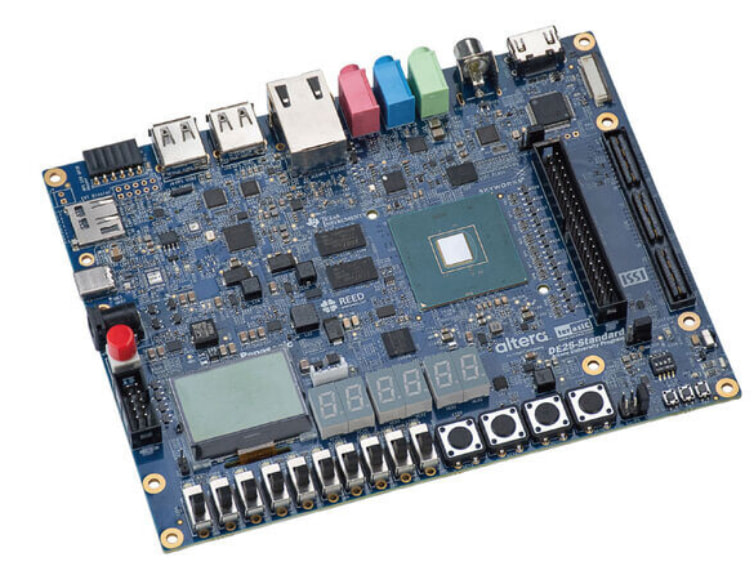
The Agilex™ 5 Simics Virtual Plafform is shown below,

The first step is to do this,
rm -rf agilex5_zgsrd
mkdir agilex5_zgsrd
cd agilex5_zgsrd
export TOP_FOLDER=$(pwd)
Update the system,
sudo apt-get update
sudo apt-get upgrade
Install all the required dependencies:
sudo apt-get install --no-install-recommends git cmake ninja-build gperf
ccache dfu-util device-tree-compiler wget
python3-dev python3-pip python3-setuptools python3-tk python3-wheel python3-venv xz-utils file libpython3-dev
make gcc gcc-multilib g++-multilib libsdl2-dev libmagic1 libguestfs-tools  libssl-dev
Get the compiler toolchain,
cd $TOP_FOLDER
wget https://developer.arm.com/-/media/Files/downloads/gnu/11.3.rel1/binrel/arm-gnu-toolchain-11.3.rel1-x86_64-aarch64-none-linux-gnu.tar.xz
tar xf arm-gnu-toolchain-11.3.rel1-x86_64-aarch64-none-linux-gnu.tar.xz
rm -f arm-gnu-toolchain-11.3.rel1-x86_64-aarch64-none-linux-gnu.tar.xz
export PATH=`pwd`/arm-gnu-toolchain-11.3.rel1-x86_64-aarch64-none-linux-gnu/bin:$PATH
echo "export PATH=`pwd`/arm-gnu-toolchain-11.3.rel1-x86_64-aarch64-none-linux-gnu/bin:\$PATH" >> $TOP_FOLDER/.zephyrrc
at this point please setup Quartus paths as needed.
To setup Zephyr RTOS now create a new virtual environment and activate it
cd $TOP_FOLDER
python3 -m venv venv
#Environment Activation
source venv/bin/activate
Now setup west, and pull the official Zephyr repo as well as other Zephyr dependencies:
pip3 install wheel
pip3 install west
west init -m https://github.com/zephyrproject-rtos/zephyr --mr v3.6-branch zephyrproject
cd $TOP_FOLDER/zephyrproject
west update
west zephyr-export
pip install -r $TOP_FOLDER/zephyrproject/zephyr/scripts/requirements.txt
then install this,
pip install sphinx-rtd-theme sphinx
and the Zephyr SDK in the folder so it can be used on Zephyr projects:
wget https://github.com/zephyrproject-rtos/sdk-ng/releases/download/v0.16.4/zephyr-sdk-0.16.4_linux-x86_64.tar.xz
wget -O - https://github.com/zephyrproject-rtos/sdk-ng/releases/download/v0.16.4/sha256.sum | shasum --check --ignore-missing
wget https://github.com/zephyrproject-rtos/sdk-ng/releases/download/v0.16.1/zephyr-sdk-0.16.1_linux-x86_64.tar.xz
wget -O - https://github.com/zephyrproject-rtos/sdk-ng/releases/download/v0.16.1/sha256.sum | shasum --check --ignore-missing
tar xf zephyr-sdk*.tar.xz -C ~/
rm zephyr-sdk*.tar.xz
$HOME/zephyr-sdk*/setup.sh -t aarch64-zephyr-elf -h -c
Finally, substitute the official “Zephyr” folder for zephyr-socfpga repository:
cd $TOP_FOLDER/zephyrproject
rm -rf zephyr
git clone -b QPDS24.3_REL_GSRD_PR --single-branch https://github.com/altera-opensource/zephyr-socfpga zephyr
west update
west zephyr-export
In our next article we will continue with this Agilex™ 5 Simics Virtual Platform that will run Zephyr RTOS setup please stay tuned. The DE-25 FPGA Dev Kit is a powerful platform featuring an HPS/FPGA Agilex 5 (available as D-Series and E-Series depending on the case) capable of implementing Tensor AI slices,

that go beyond what traditional/classical old school DSP slices implemented in the past,

and it is available at DigiKey.
Have a wonderful day!
This article is available in spanish here.
Este artículo está disponible en españól aquí.