


Lattice ICE40 UltraPlus 擴展板 ( ICE40UP5K-B-EVN ) 是一款優秀的入門級 FPGA 開發板,但其搭載的 ICE40UP5K FPGA 採用 1.2V 核心供電,功能強大,適用於多種應用。
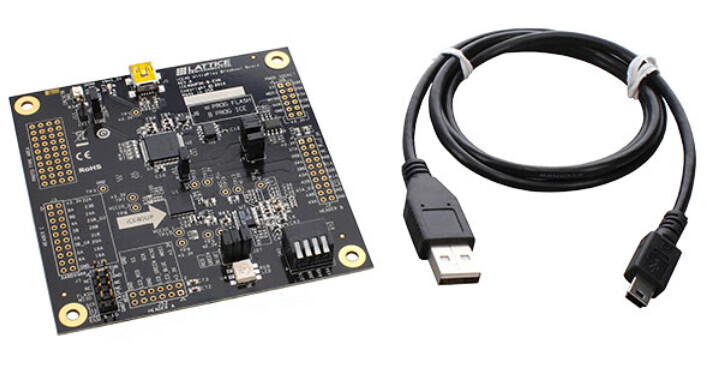
Lattice ICE40 UltraPlus 擴展板 具有以下功能:
採用 48 腳 QFN 封裝的 ICE40 UltraPlus (iCE40UP5K-SG48) 處理器。
— 採用此 0.5mm 間距 QFN 封裝的電路板範例
— 高電流 RGB LED 輸出
— iCE40 UltraPlus 電流測量
— 用於處理器編程的標準 USB 線
— 符合 RoHS 標準的封裝與工藝
Lattice ICE40 UltraPlus 擴展板可用於對 iCE40 UltraPlus 或 SPI Flash 進行程式設計:
SPI Flash 程式設計:J6 分線腳位 1-3 和 2-4 短接(預設短接)
— U5 Micron Technology Inc. 零件號碼 N25Q032A13ESC40F
iCE40 UltraPlus 配置或程式設計:J6 分線腳位 1-2 和 3-4 短接
— U1 iCE40UP5K – SG48
按下 SW1 可使 CRESETB 置位
— 可使用 J11 進行探測
完成 LED D2
— 可使用 J28 進行探測(預設短接)
Lattice ICE40 UltraPlus 擴展板的框圖如下所示。

本擴展板的第一個示範是開發一個簡單的 Verilog HDL 程序,將開關直接連接到板上的 RGB LED。要實現這一目標通常有三種方法:一種是透過 Lattice 開發軟體,另一種是透過開源專案 IceStorm,還有一種是透過之前多次介紹過的非常簡單的經典 APIO 機制。
本文將介紹專案 IceStorm 和 APIO 機制。此示範將在透過 USB 連接線連接到 Lattice ICE40 UltraPlus 擴展板的 Linux 主機上進行開發。專案 IceStorm 的安裝過程如下:
sudo apt install yosys nextpnr-ice40 fpga-icestorm
與此示範相關的 Verilog HDL 程式碼是 leds.v
module top(input [3:0] SW, output LED_R, output LED_G, output LED_B);

  assign LED_R = SW[0];
  assign LED_G = SW[1];
  assign LED_B = SW[2];

endmodule
此模組將電路板上的每個開關直接連接到相應的紅色、綠色和藍色LED,因為這款 RGB LED 可以根據這三個邏輯電平的組合產生 8 種不同的顏色組合。在本範例中,影片僅測試了其中三種顏色。 ( PWM RGB 訊號可產生更多顏色,但本入門示範中未使用此方法。)
創建這個簡單的 FPGA 設計還需要其他文件。專案文件名為 leds.json,採用 JSON 格式,可在此處取得。
leds.json (301.9 KB)
一個名為 io.pcf 的檔案將定義此專案中使用的引腳。
# For the iCE40 UltraPlus (iCE40UP5K-QFN) Breakout Board

set_io LED_R 41
set_io LED_G 40
set_io LED_B 39
set_io SW[0] 23
set_io SW[1] 25
set_io SW[2] 34
set_io SW[3] 43
set_io clk 35

# bank 0
set_io IOT_39A 26
set_io IOT_38B 27
set_io IOT_42B 31
set_io IOT_43A 32
set_io IOT_45A_G1 37
set_io IOT_51A 42
set_io IOT_50B 38

#spi
set_io SPI_SS 16
set_io SPI_SCK 15
set_io SPI_MOSI 17
set_io SPI_MISO 14
本示範中並非會使用所有這些腳,只有 LED_R、LED_G、LED_B、SW[0]、SW[1] 和 SW[2] 是相關的。其他沒有在本示範中使用的接腳用於 bank 0 和 SPI 介面。如有需要,可擴充此文件以包含更多定義。
第一步是建立包含以下所有文件的專案資料夾。
digikey_coffee_cup@switch: ls

leds.v
leds.json
io.pcf
首先依照以下步驟使用 yosys 處理專案:
digikey_coffee_cup@switch: yosys -p synth_ice40 "-top top -json leds.json" leds.v
這將在 Linux 終端機中產生以下輸出:
[00000.000037]  /----------------------------------------------------------------------------\
[00000.000043]  |                                                                            |
[00000.000048]  |  yosys -- Yosys Open SYnthesis Suite                                       |
[00000.000052]  |                                                                            |
[00000.000056]  |  Copyright (C) 2012 - 2020  Claire Xenia Wolf <claire@yosyshq.com>         |
[00000.000059]  |                                                                            |
[00000.000063]  |  Permission to use, copy, modify, and/or distribute this software for any  |
[00000.000067]  |  purpose with or without fee is hereby granted, provided that the above    |
[00000.000071]  |  copyright notice and this permission notice appear in all copies.         |
[00000.000074]  |                                                                            |
[00000.000078]  |  THE SOFTWARE IS PROVIDED "AS IS" AND THE AUTHOR DISCLAIMS ALL WARRANTIES  |
[00000.000081]  |  WITH REGARD TO THIS SOFTWARE INCLUDING ALL IMPLIED WARRANTIES OF          |
[00000.000110]  |  MERCHANTABILITY AND FITNESS. IN NO EVENT SHALL THE AUTHOR BE LIABLE FOR   |
[00000.000117]  |  ANY SPECIAL, DIRECT, INDIRECT, OR CONSEQUENTIAL DAMAGES OR ANY DAMAGES    |
[00000.000121]  |  WHATSOEVER RESULTING FROM LOSS OF USE, DATA OR PROFITS, WHETHER IN AN     |
[00000.000127]  |  ACTION OF CONTRACT, NEGLIGENCE OR OTHER TORTIOUS ACTION, ARISING OUT OF   |
[00000.000140]  |  OR IN CONNECTION WITH THE USE OR PERFORMANCE OF THIS SOFTWARE.            |
[00000.000146]  |                                                                            |
[00000.000152]  \----------------------------------------------------------------------------/
[00000.000156]
[00000.000164]  Yosys 0.33 (git sha1 2584903a060)
[00000.000170]
[00000.001164]
[00000.001173] -- Parsing `leds.v' using frontend ` -vlog2k' --
[00000.001269]
[00000.001279] 1. Executing Verilog-2005 frontend: leds.v
[00000.001284] Parsing Verilog input from `leds.v' to AST representation.
[00000.001408] Storing AST representation for module `$abstract\top'.
[00000.001428] Successfully finished Verilog frontend.
[00000.001444]
[00000.001451] -- Running command `synth_ice40' --
[00000.001460]
[00000.001465] 2. Executing SYNTH_ICE40 pass.
[00000.001497]
[00000.001501] 2.1. Executing Verilog-2005 frontend: /usr/bin/../share/yosys/ice40/cells_sim.v
[00000.001506] Parsing Verilog input from `/usr/bin/../share/yosys/ice40/cells_sim.v' to AST representation.
[00000.013292] Generating RTLIL representation for module `\SB_IO'.
[00000.013424] Generating RTLIL representation for module `\SB_GB_IO'.
[00000.013586] Generating RTLIL representation for module `\SB_GB'.
[00000.013613] Generating RTLIL representation for module `\SB_LUT4'.
[00000.013963] Generating RTLIL representation for module `\SB_CARRY'.
[00000.014145] Generating RTLIL representation for module `\SB_DFF'.
[00000.014329] Generating RTLIL representation for module `\SB_DFFE'.
[00000.014576] Generating RTLIL representation for module `\SB_DFFSR'.
[00000.014914] Generating RTLIL representation for module `\SB_DFFR'.
[00000.015245] Generating RTLIL representation for module `\SB_DFFSS'.

......
etc etc etc
......


 Executing Verilog-2005 frontend: /usr/bin/../share/yosys/ice40/cells_map.v
[00000.455808] Parsing Verilog input from `/usr/bin/../share/yosys/ice40/cells_map.v' to AST representation.
[00000.456112] Generating RTLIL representation for module `\$lut'.
[00000.456328] Successfully finished Verilog frontend.
[00000.456341]
[00000.456344] 2.44.2. Continuing TECHMAP pass.
[00000.456365] No more expansions possible.
[00000.456387] <suppressed ~3 debug messages>
[00000.459356]
[00000.459365] 2.45. Executing AUTONAME pass.
[00000.459978]
[00000.459982] 2.46. Executing HIERARCHY pass (managing design hierarchy).
[00000.459989]
[00000.459993] 2.46.1. Analyzing design hierarchy..
[00000.459996] Top module:  \top
[00000.460003]
[00000.460007] 2.46.2. Analyzing design hierarchy..
[00000.460010] Top module:  \top
[00000.460016] Removed 0 unused modules.
[00000.460886]
[00000.460891] 2.47. Printing statistics.
[00000.460898]
[00000.460902] === top ===
[00000.460903]
[00000.460907]    Number of wires:                  4
[00000.460910]    Number of wire bits:              7
[00000.460913]    Number of public wires:           4
[00000.460918]    Number of public wire bits:       7
[00000.460920]    Number of memories:               0
[00000.460924]    Number of memory bits:            0
[00000.460927]    Number of processes:              0
[00000.460930]    Number of cells:                  0
[00000.460940]
[00000.461566] 2.48. Executing CHECK pass (checking for obvious problems).
[00000.461573] Checking module top...
[00000.461584] Found and reported 0 problems.
[00000.462700]
[00000.462704] -- Writing to `p top -json leds.json' using backend `json' --
[00000.462865]
[00000.462870] 3. Executing JSON backend.

End of script. Logfile hash: 0c9178c87b, CPU: user 0.46s system 0.01s, MEM: 19.25 MB peak
Yosys 0.33 (git sha1 2584903a060)
Time spent: 74% 13x read_verilog (0 sec), 7% 1x synth_ice40 (0 sec), ...
若要繼續建置流程,請發出執行 FPGA 佈局佈線的命令:
digikey_coffee_cup@switch: nextpnr-ice40 --up5k --json leds.json --pcf io.pcf --asc leds.asc
完成後,終端將顯示以下內容:
...
etc.
...
Info: [ 79233,  79271) |
Info: [ 79271,  79309) |
Info: [ 79309,  79347) |
Info: [ 79347,  79385) |
Info: [ 79385,  79423) |
Info: [ 79423,  79461) |*
13 warnings, 0 errors

Info: Program finished normally.
若要完成建置過程,請按如下方式建立 .bin 檔案:
digikey_coffee_cup@switch: icepack leds.asc leds.bin
FPGA 可以如下程式設計到 SRAM 中:
digikey_coffee_cup@switch: iceprog -S leds.bin
或寫入 FLASH 快閃記憶體,
digikey_coffee_cup@switch: iceprog leds.bin
請確保擴展板上 J6 處的跳線已針對每種情況正確配置,請參閱下方的電路板詳細資訊。

下圖是電路板上的跳線配置示意圖,更清楚地展示了跳線的位置。

完成此步驟後,FPGA 即設定完成。以下影片示範了此過程。
影片顯示,按下每個按鈕時,對應的 RGB LED 燈會亮起。這是一個簡單的「非同步」FPGA 設定範例。
本章介紹了這款優秀開發板的 IceStorm FPGA 設定機制。下一章我們將介紹如何使用 APIO 設定 FPGA 開發板。 Lattice ICE40 UltraPlus 擴展板是一款便攜式、價格低廉的原型面積 FPGA 開發板,可用於多種應用,可在 DigiKey 購買。