We use cookies to provide our visitors with an optimal site experience. View our privacy notice and cookie notice to learn more about how we use cookies and how to manage your settings. By proceeding on our website you consent to the use of cookies.
Tried Scheme-it for the first time and found it relatively easy to learn and use. But all attempts to Print resulted in “Error error” and when I try Save or Save-as it just spins. The link to “Help” doesn’t seem to work but the Forum one got me here!
Are these known problems or is it just me? I was logged into my DigiKey account when this occurred. Thanks.
Also, please attach any
error messages that you are seeing.
Curt -
Thanks for your response, I do feel bad about complaining about something that is free, but everyone will benefit from improvements. I mis-stated one issue - it was when I tried to “Export” that I got the error shown in the screen below. The “Print” option proceeds to open a new window with my schematic in it, but there’s no way to print it from that window, other than doing what I did in the first place and taking a screen capture. Printing and Saving are pretty important to be able to do.
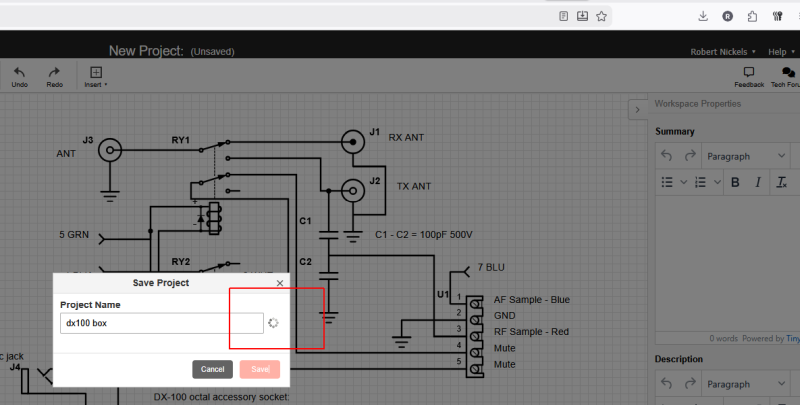
When I try to save, I just get the spinning icon forever. I can log in and out but it always uses my saved DigiKey credentials, the same that I use when placing orders. I don’t see a way to create a separate account for Scheme-it, or understand why it should be necessary. Note in the screen below
it shows me as logged-in (upper right corner) yet the Save and Save As functions don’t seem to work.
If already having a DigiKey account log-in makes it difficult to use Scheme-it, that would seem to be worthy of attention. Can you tell me specifically how to create this Scheme-it log-in without triggering my usual one?
Thanks,
Bob
PS: Your email responses say “reply to this email” but when I tried that, it bounced. So I came to the web forum to re-send this.
Thank you for the response. I apologize for making things confusing. Scheme It and DigiKey do not have two different logins. There are times when a customer can be logged in to DigiKey but be logged out of Scheme It. However, they share the same login information. As long as you see you are logged in, you are fine.
I’m also sending you an email to ask a couple of additional questions.
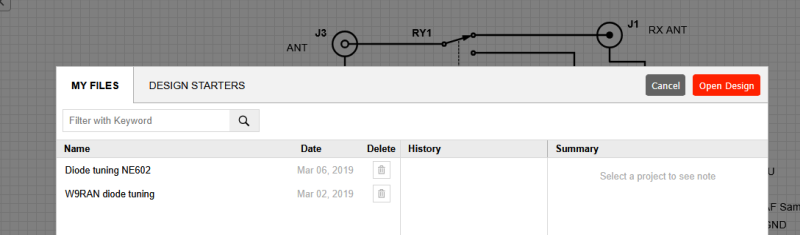
Well that’s the Catch 22 - since I can’t save my file, it doesn’t show up when I click Open. Just two older schematics are listed. Even though I’m logged-in, the little icon just spins forever…
I’m also have problems saving my work, I started my project before I had created my account. I created my account when I tried to save my work. I don’t get any error messages, just a spinning icon. Any ideas would be greatly appreciated.
Hi @don.thompson, thank you for getting in touch with us.
I went through the process and was not able to replicate the issue. If you refresh the page, are you still not able to save your project?


 |
|