


Deprecated Article
This article has been retained for historical reference but is no longer the primary guide to this trainer. For current design guidance, component selection, classroom applications, and the complete parts list, see Outfitting an Industrial Automation Lab.
Industrial control technology is a growing field for DigiKey. To better understand the technology, we all need to spend some time at the workbench.
Traditional electronics prototypes are constructed using a small breadboard featuring 0.1-inch component spacing. That doesn’t work for industrial components, as most are designed for installation on a DIN rail. What we needed was an industrial breadboard; something versatile, rugged, and low cost.
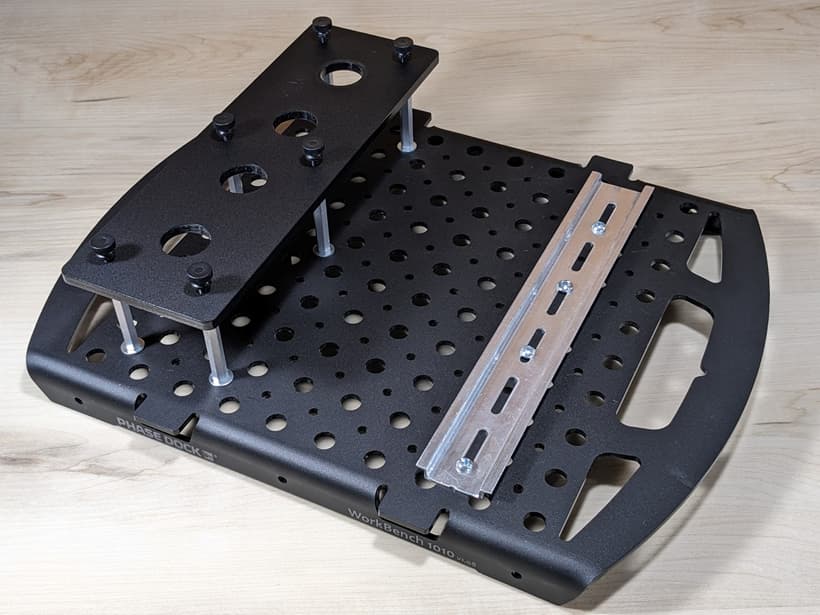
Figure 1: Image of the Phase Dock trainer with supporting hardware (sold separately).
Development of the Industrial Trainer
I’d like to tell you that the product emerged as a fully formed idea implemented in a single pass. But that’s not how most things work. Instead, there were many iterations and refinements.
The original designs were based on Phase Dock 10-10 platform that was readily available in the DigiKey lab. These platforms were designed for students as a rigid mounting platform for microcontroller projects. The major selling point is that the wires will remain in place when the student’s project is transported. The robust aspects carry over when a DIN rail is installed on the base.
The switch plate for the 22 mm pushbuttons and panel indicators took longer to develop. I cut the first version out of aluminum. This worked very well, but it didn’t scale, as it takes time to cut and punch the holes. Later, I discovered that DigiKey technicians had untapped talent. A day after the conversation, I had a 3D printed part on my desk. After a week I had the first laser cut switch plate.
At this point, we had our industrial breadboard. We gained experience as it was featured in several TechForum articles. The final step was to return to Phase Dock and request that the switch plate be added to the 10-10 base. Before moving on, I should mention the nylon thumb screws. Originally, I had used screws and was considering adding magnets for quick release of the switch plate. In conversation, one of the partners suggested nylon thumb screw. This was a very good idea as they are inexpensive and add an attractive feature to the trainer.
Trainer Applications
Part of my DigiKey tasking is to provide technology demonstrations and document the results in the TechForum. This trainer has been featured in many articles. Some examples include the safety relay as shown in Figures 2 and 3.
-
A Schneider Electric safety relay is evaluated in Figure 2. The primary focus is the relay-to-emergency stop connection. A secondary focus is the Schneider motor starter and the E-T-A solid-state circuit breaker
-
A Siemens LOGO! PLC is evaluated in Figure 3. The primary focus is the LOGO! PLC with its integral HMI. The 4-position (22 mm) switch plate can accommodate a variety of field devices ranging from pushbuttons to variable resistors, and even ultrasonic sensors.

Figure 2: The trainer is used to evaluate a Schneider safety relay.

Figure 3: The trainer is used for experiments featuring the Siemens LOGO! PLC.
Academic Use of the Trainer
The industrial breadboard is a natural fit for students. The best part is that students get to wire real-world components. This provides a natural way to discover the interaction between components with room to learn from mistakes. While the DIN rail size is limited to 9-inches, there are thousands of supported experiments. As an example, consider Figure 4 featuring MIKROE interface boards allowing an Arduino Minima (hidden in the card stack) to operate as a PLC with a 24 VDC interface.
The teamwork extends to other entities including Arduino. The trainer as configured in Figure 4 is featured in the Arduino Academy’s Opta ACE 100 course.

Figure 4: Trainer used to explore PLC elements based on MIKROE Click board on an Arduino Minima.
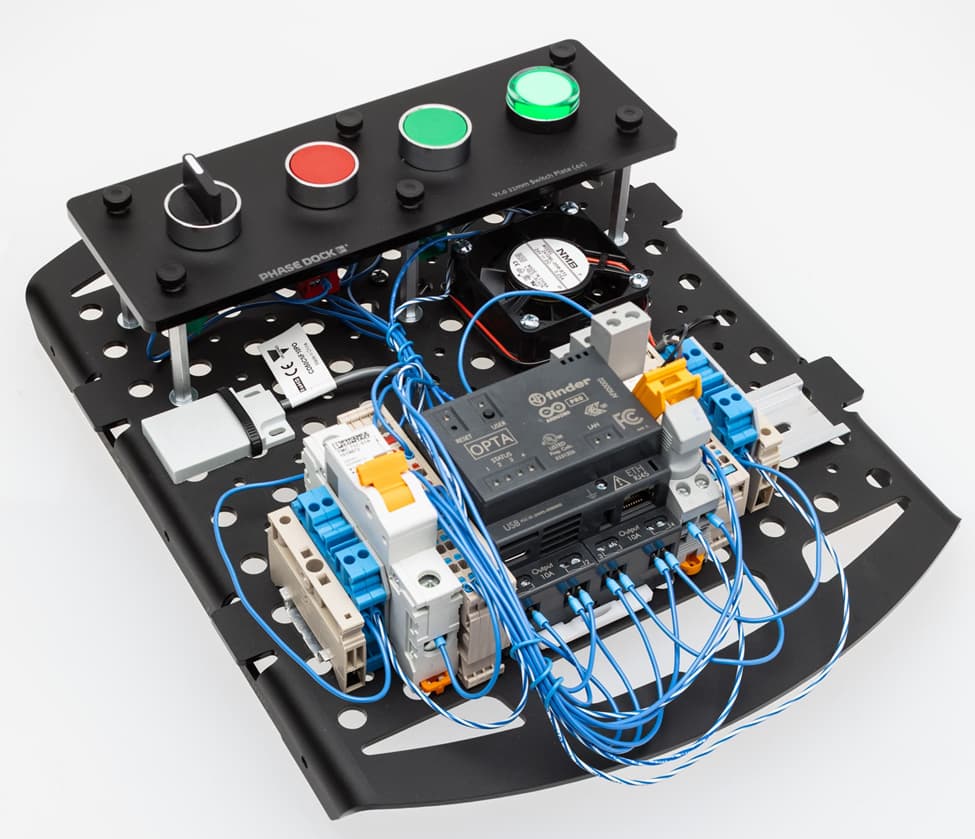
Figure 5: Arduino Opta kit featuring the Phase Dock trainer platform.
Parting Thoughts
The trainer is the result of teamwork. The result is right-sized learning platform suitable for self-discovery or for rigorous classroom study. You can quickly learn about new or unusual components or host a complete industrial course starting with relays and ending at networked PLC.
It’s been a fun development cycle working with many people across the industry. I thank each of you who have contributed to the design.
Best Wishes,
Aaron
 Continue Exploring Industrial Control Systems
If this discussion was helpful, you may also want to explore:
 DigiKey Navigation
- Full Catalog: Industrial Control & Automation
 Related Foundational Articles
- Guide to Troubleshooting Industrial Control and Automation Equipment
- Applications of Type PNP and NPN Sensors
- Use of an Interposing Relay for Increased Contactor Speed
About This Author
Aaron Dahlen, LCDR USCG (Ret.), is a Senior Applications Engineer at DigiKey in Thief River Falls. His background in electronics and industrial automation was shaped by a 27-year military career as both technician and engineer, followed by over a decade of teaching.
Dahlen holds an MSEE from Minnesota State University, Mankato. He has taught in an ABET-accredited electrical engineering program, served as coordinator of an electronic engineering technology program, and instructed military technicians in component-level repair.
Today, he has returned to his home in northern Minnesota, completing a decades-long journey that began with a search for capacitors. Read his story here.