


Can the subject part be programmed with the ZUSBESC0200ZACG?
Hello Randy,
Thank you for contacting DigiKey Technical Support.
Yes, part number Z8FS040BSB20EG can be programmed with part number ZUSBESC0200ZACG.
Per manufacture website it can debug Z8 Encore!.
Thank you, Nathan. In the ZUSBESC0200ZACG user manual (under the DigiKey datasheet link), there is a link to download the software for the product. The “readme” file on the Zilog site admits to a “Microsoft SmartScreen” error, but states to ignore it and proceed with installation. However, windows cannot open or extract the downloaded zip file. Does DigiKey have any experience with downloading and installing this software? Is there another way to obtain the software?
When you get the Windows protected your PC prompt click
More info
Then select
Run anyway
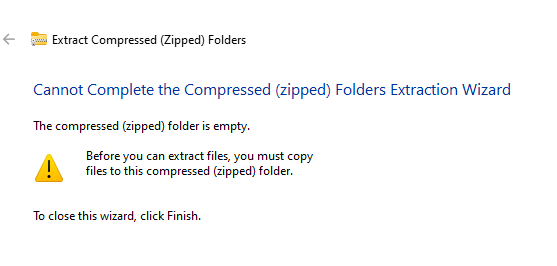
I downloaded the zip file to my laptop and got the same error.
Looks like Windows compression utility doesn’t like the format.
I downloaded a third party compression tool, WinRar, and was able to extract and install the executable after I went through the warning More Info Run Anyway steps.
I just want to quick summarize the error so people with search engines can find this:
Downloading Zilog’s zip archive for ZDS II - Z8 Encore gives Microsoft Windows an error message when attempting to extract, the message indicates “The compressed (zipped) folder is empty.”
Thank you, Kristof, I had the same success with 7-zip.
I recently purchased 2 of part number ZUSBESC0200ZACG. I’m familiar with using the previous model of this device (USB smart cable), but am unable to use the ZUSBESC0200ZACG because windows doesn’t recognise the old drivers when the device is connected.
I have had the same problem with bad downloads from Zilog, but I can’t get Windows, WinZip, 7-Zip, or WinRAR to open them.
The Zilog contact page is also non-functional and LittelFuse has not responded to my request for help. Any further ideas as to how I can get hold of Smart Flash Programmer(SFP) 2.4.0 software install?
Hello john12, welcome to the TechForum! I also checked out Zilog’s page and the ZIP file appears to be empty. This doesn’t seem normal, so I am reaching out to our contacts to see if there is a problem with the files.
I am still waiting for feedback from Zilog. I have been in contact on a weekly basis. Just thought I’d provide an update.
Cool. Thanks
Zilog’s site has run into some compatibility problems causing files to have the issue described. I recently have been given access to the files and they are available for public use so I can share the working zip file.
ZSP_2.4.0_22101201.zip (11.0 MB)
I tested extracting this on my end and it appears to work.
Thanks for your effort on this Kaleb. The file you attached appears to be for the Zilog standalone programmer. This is a different device to the ZUSBESC0200ZACG and I’ve not been able to get Windows 10 to recognise the drivers (stored C:\Windows\System32\DriverStore\FileRepository).for this device. So I still have 2 ZUSBESC0200ZACG bought from DigiKey that I’m unable to use
Problem solved - I think
Zilog have fixed the download for zsfp_SFP_2.4.0_23031901.zip. This zip file is ok.
It didn’t seem to recognise the new USB programmer until I noticed the drop-down menu for selecting the communication device has a new item “EncoreSmartCable” in addition to “USBSmartCable”. So ZSFP version 2.4 recognises old and new USB programmers
I spoke too soon. As said above, the driver is recognised by the PC, with ZUSBESC0200ZACG’s LED illuminating when connected to PC, but gives an error when attemting to program the target.
In their default state, these Encore Smart Cable programmers don’t appear to be compatible with the old USB Smart Cable programmers.
The manual is not specific about PC app used for programming, but shows a setup menu that allows disabling the Stop Mode Signal. This signal is on a programmer pin that I don’t use.
This setup manu doesn’t seem to be on the ZSFP app, so I tried to download the ZDS II - Z8 Encore! version 5.7.0, but is has the same download problem as previously found. I can only download a corrupted zip file. Could you ask Zilog to fix this download link?