


In our previous post we illustrated how to setup a direct point to point WiFi acces point (like a hotspot) where a device like a computer, cellphone, tablet or laptop can be connected to control the state of an onboard LED in the Raspberry Pico 2 W without the typical LAN WiFi router in the middle from a web browser. By modifying a few lines in the previous code a simple remote control via direct WiFi can be created to control a device like a coffee maker, lamp, etc. from an HTTP client. Depending on the device to be controlled, DigiKey has many options for your design like,

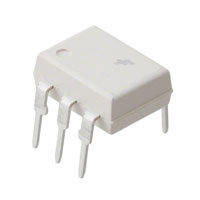

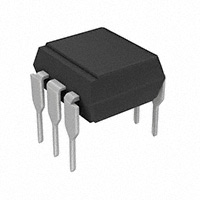


- Magnetic coupling gate driver (like the 1EDI20N12AFXUMA1)

- RF coupling gate drive isolators ( ideal for driving power silicon MOSFETs, IGBTs, and SiC FETs, and GaN FETs used in various power and motor control applications) like the SI8271BB
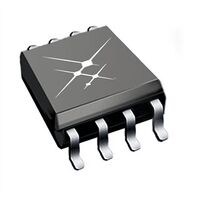
- Capacitive coupling gate drive isolators ( ideal for driving power silicon MOSFETs, IGBTs, and SiC FETs, and GaN FETs used in various power and motor control applications) like the Si82Bx device (eval board)
Just to name some components, that can be used for this purpose (depending on the electrical device being controlled of course). Please follow the proper design and safety guidelines, this is just an illustration of an application for this C code. This is not an attempt to create a fail safe discrete control design (This platform is not meant to be used as a complete fail-safe control solution neither). The relevant lines of the C code from the previous post that can be changed as needed are,
#define HTTP_RESPONSE_HEADERS "HTTP/1.1 %d OK\nContent-Length: %d\nContent-Type: text/html; charset=utf-8\nConnection: close\n\n"
#define LED_TEST_BODY "<html><body><h1>Hello from Pico.</h1><p>Led is %s</p><p><a href=\"?led=%d\">Turn led %s</a></body></html>"
#define LED_PARAM "led=%d"
#define LED_TEST "/ledtest"
#define LED_GPIO 0
#define HTTP_RESPONSE_REDIRECT "HTTP/1.1 302 Redirect\nLocation: http://%s" LED_TEST "\n\n"
Customized them as needed (this is the http and html format message that can be changed to a customized Coffee Maker, Lamp, Fan, etc.) and use a GPIO terminal (GP) in the C code to use the desired (General Purpose Input Output) terminal. The following picture illustrate the available GPIO terminals in the eval board,

Add the GPIO library from the C SDK to the application and use the function to initialize the desired GPIO port using the picture shown above. Modify the following portion of the code from our previous post to add the function that will change the state of the GPIO line (the green LED function can be kept as an indicator),
// See if the user changed it
        if (params) {
            int led_param = sscanf(params, LED_PARAM, &led_state);
            if (led_param == 1) {
                if (led_state) {
                    // Turn led on
                    cyw43_gpio_set(&cyw43_state, LED_GPIO, true);

                   //Add function to control GPIO here (Turn on device)


                } else {
                    // Turn led off
                    cyw43_gpio_set(&cyw43_state, LED_GPIO, false);

                     //Add function to control GPIO here (Turn off device)

                }
            }
        }
Build and flash the application to the Raspberry Pico 2 W. Once the GPIO is selected, then connect the external circuit to condition the discrete GPIO signal that will control the relay, solid state relay etc as needed. Keep in mind that depending on the output circuit, it might modify (can invert the state of) the device being controlled so the code has to be changed if needed. Other discrete driving schemes might be needed depending on the solution needed. Each of these Wireless Access Points controlling each electrical device can be customized with a unique WiFi Hotspot ID (CoffeMaker, Room1Lamp, FanonRoom1, etc) with corresponding passwords. All of these devices can be used concurrently. The Raspberry Pico 2 W is available from DigiKey. Have a nice day!

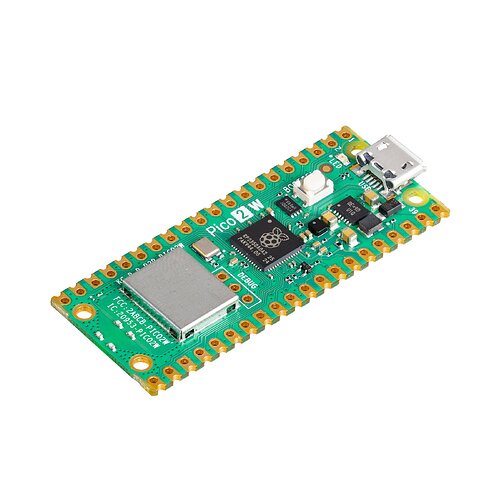
SC1633 | DigiKey Electronics
Order today, ships today. SC1633 – CYW43439, RP2350 - Transceiver; 802.11 b/g/n (Wi-Fi, WiFi, WLAN), Bluetooth® 5.x (BLE) 2.4GHz Evaluation Board from Raspberry Pi. Pricing and Availability on millions of electronic components from Digi-Key…
Solid State Relays (SSR) | Electronic Components Distributor DigiKey
Electronic Components and Parts Search | DigiKey Electronics
This article is available in spanish here.
Este artículo está disponible en español aquí.