


En este artículo, vamos a describir como configurar la Raspberry Pico 2 W como un punto de acceso inalámbrico conocido como “wireless access point” o “WiFi Hotspot” en 2.4GHz IEEE 802.11n standard con el SDK en C. Este artefacto usa un sérvidor con el protocolo conocido como “Dynamic Host Control Protocol (DHCP)” para asignar una dirección de internet de la red local (LAN) conodico como “IP address” a el cliente (usando un célular o laptop) que se conecta al mismo directamente como si fuera un “Wi-Fi router”.
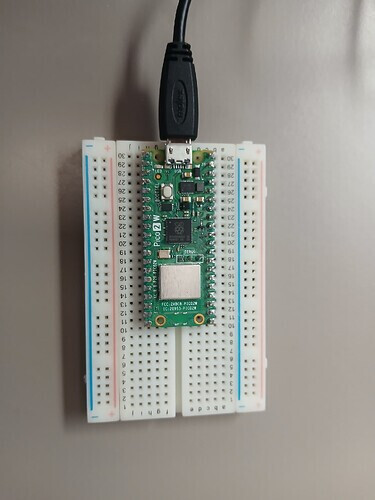
Este artículo asume que se ha instalado el SDK de C en la computadora. Primeramente, se procede a compilar el código en C que se muestra a continuación,
/**
 * Copyright (c) 2022 Raspberry Pi (Trading) Ltd.
 *
 * SPDX-License-Identifier: BSD-3-Clause
 */

#include <string.h>

#include "pico/cyw43_arch.h"
#include "pico/stdlib.h"

#include "lwip/pbuf.h"
#include "lwip/tcp.h"

#include "dhcpserver.h"
#include "dnsserver.h"

#define TCP_PORT 80
#define DEBUG_printf printf
#define POLL_TIME_S 5
#define HTTP_GET "GET"
#define HTTP_RESPONSE_HEADERS "HTTP/1.1 %d OK\nContent-Length: %d\nContent-Type: text/html; charset=utf-8\nConnection: close\n\n"
#define LED_TEST_BODY "<html><body><h1>Hello from Pico.</h1><p>Led is %s</p><p><a href=\"?led=%d\">Turn led %s</a></body></html>"
#define LED_PARAM "led=%d"
#define LED_TEST "/ledtest"
#define LED_GPIO 0
#define HTTP_RESPONSE_REDIRECT "HTTP/1.1 302 Redirect\nLocation: http://%s" LED_TEST "\n\n"

typedef struct TCP_SERVER_T_ {
    struct tcp_pcb *server_pcb;
    bool complete;
    ip_addr_t gw;
} TCP_SERVER_T;

typedef struct TCP_CONNECT_STATE_T_ {
    struct tcp_pcb *pcb;
    int sent_len;
    char headers[128];
    char result[256];
    int header_len;
    int result_len;
    ip_addr_t *gw;
} TCP_CONNECT_STATE_T;

static err_t tcp_close_client_connection(TCP_CONNECT_STATE_T *con_state, struct tcp_pcb *client_pcb, err_t close_err) {
    if (client_pcb) {
        assert(con_state && con_state->pcb == client_pcb);
        tcp_arg(client_pcb, NULL);
        tcp_poll(client_pcb, NULL, 0);
        tcp_sent(client_pcb, NULL);
        tcp_recv(client_pcb, NULL);
        tcp_err(client_pcb, NULL);
        err_t err = tcp_close(client_pcb);
        if (err != ERR_OK) {
            DEBUG_printf("close failed %d, calling abort\n", err);
            tcp_abort(client_pcb);
            close_err = ERR_ABRT;
        }
        if (con_state) {
            free(con_state);
        }
    }
    return close_err;
}

static void tcp_server_close(TCP_SERVER_T *state) {
    if (state->server_pcb) {
        tcp_arg(state->server_pcb, NULL);
        tcp_close(state->server_pcb);
        state->server_pcb = NULL;
    }
}

static err_t tcp_server_sent(void *arg, struct tcp_pcb *pcb, u16_t len) {
    TCP_CONNECT_STATE_T *con_state = (TCP_CONNECT_STATE_T*)arg;
    DEBUG_printf("tcp_server_sent %u\n", len);
    con_state->sent_len += len;
    if (con_state->sent_len >= con_state->header_len + con_state->result_len) {
        DEBUG_printf("all done\n");
        return tcp_close_client_connection(con_state, pcb, ERR_OK);
    }
    return ERR_OK;
}

static int test_server_content(const char *request, const char *params, char *result, size_t max_result_len) {
    int len = 0;
    if (strncmp(request, LED_TEST, sizeof(LED_TEST) - 1) == 0) {
        // Get the state of the led
        bool value;
        cyw43_gpio_get(&cyw43_state, LED_GPIO, &value);
        int led_state = value;

        // See if the user changed it
        if (params) {
            int led_param = sscanf(params, LED_PARAM, &led_state);
            if (led_param == 1) {
                if (led_state) {
                    // Turn led on
                    cyw43_gpio_set(&cyw43_state, LED_GPIO, true);
                } else {
                    // Turn led off
                    cyw43_gpio_set(&cyw43_state, LED_GPIO, false);
                }
            }
        }
        // Generate result
        if (led_state) {
            len = snprintf(result, max_result_len, LED_TEST_BODY, "ON", 0, "OFF");
        } else {
            len = snprintf(result, max_result_len, LED_TEST_BODY, "OFF", 1, "ON");
        }
    }
    return len;
}

err_t tcp_server_recv(void *arg, struct tcp_pcb *pcb, struct pbuf *p, err_t err) {
    TCP_CONNECT_STATE_T *con_state = (TCP_CONNECT_STATE_T*)arg;
    if (!p) {
        DEBUG_printf("connection closed\n");
        return tcp_close_client_connection(con_state, pcb, ERR_OK);
    }
    assert(con_state && con_state->pcb == pcb);
    if (p->tot_len > 0) {
        DEBUG_printf("tcp_server_recv %d err %d\n", p->tot_len, err);
#if 0
        for (struct pbuf *q = p; q != NULL; q = q->next) {
            DEBUG_printf("in: %.*s\n", q->len, q->payload);
        }
#endif
        // Copy the request into the buffer
        pbuf_copy_partial(p, con_state->headers, p->tot_len > sizeof(con_state->headers) - 1 ? sizeof(con_state->headers) - 1 : p->tot_len, 0);

        // Handle GET request
        if (strncmp(HTTP_GET, con_state->headers, sizeof(HTTP_GET) - 1) == 0) {
            char *request = con_state->headers + sizeof(HTTP_GET); // + space
            char *params = strchr(request, '?');
            if (params) {
                if (*params) {
                    char *space = strchr(request, ' ');
                    *params++ = 0;
                    if (space) {
                        *space = 0;
                    }
                } else {
                    params = NULL;
                }
            }

            // Generate content
            con_state->result_len = test_server_content(request, params, con_state->result, sizeof(con_state->result));
            DEBUG_printf("Request: %s?%s\n", request, params);
            DEBUG_printf("Result: %d\n", con_state->result_len);

            // Check we had enough buffer space
            if (con_state->result_len > sizeof(con_state->result) - 1) {
                DEBUG_printf("Too much result data %d\n", con_state->result_len);
                return tcp_close_client_connection(con_state, pcb, ERR_CLSD);
            }

            // Generate web page
            if (con_state->result_len > 0) {
                con_state->header_len = snprintf(con_state->headers, sizeof(con_state->headers), HTTP_RESPONSE_HEADERS,
                    200, con_state->result_len);
                if (con_state->header_len > sizeof(con_state->headers) - 1) {
                    DEBUG_printf("Too much header data %d\n", con_state->header_len);
                    return tcp_close_client_connection(con_state, pcb, ERR_CLSD);
                }
            } else {
                // Send redirect
                con_state->header_len = snprintf(con_state->headers, sizeof(con_state->headers), HTTP_RESPONSE_REDIRECT,
                    ipaddr_ntoa(con_state->gw));
                DEBUG_printf("Sending redirect %s", con_state->headers);
            }

            // Send the headers to the client
            con_state->sent_len = 0;
            err_t err = tcp_write(pcb, con_state->headers, con_state->header_len, 0);
            if (err != ERR_OK) {
                DEBUG_printf("failed to write header data %d\n", err);
                return tcp_close_client_connection(con_state, pcb, err);
            }

            // Send the body to the client
            if (con_state->result_len) {
                err = tcp_write(pcb, con_state->result, con_state->result_len, 0);
                if (err != ERR_OK) {
                    DEBUG_printf("failed to write result data %d\n", err);
                    return tcp_close_client_connection(con_state, pcb, err);
                }
            }
        }
        tcp_recved(pcb, p->tot_len);
    }
    pbuf_free(p);
    return ERR_OK;
}

static err_t tcp_server_poll(void *arg, struct tcp_pcb *pcb) {
    TCP_CONNECT_STATE_T *con_state = (TCP_CONNECT_STATE_T*)arg;
    DEBUG_printf("tcp_server_poll_fn\n");
    return tcp_close_client_connection(con_state, pcb, ERR_OK); // Just disconnect clent?
}

static void tcp_server_err(void *arg, err_t err) {
    TCP_CONNECT_STATE_T *con_state = (TCP_CONNECT_STATE_T*)arg;
    if (err != ERR_ABRT) {
        DEBUG_printf("tcp_client_err_fn %d\n", err);
        tcp_close_client_connection(con_state, con_state->pcb, err);
    }
}

static err_t tcp_server_accept(void *arg, struct tcp_pcb *client_pcb, err_t err) {
    TCP_SERVER_T *state = (TCP_SERVER_T*)arg;
    if (err != ERR_OK || client_pcb == NULL) {
        DEBUG_printf("failure in accept\n");
        return ERR_VAL;
    }
    DEBUG_printf("client connected\n");

    // Create the state for the connection
    TCP_CONNECT_STATE_T *con_state = calloc(1, sizeof(TCP_CONNECT_STATE_T));
    if (!con_state) {
        DEBUG_printf("failed to allocate connect state\n");
        return ERR_MEM;
    }
    con_state->pcb = client_pcb; // for checking
    con_state->gw = &state->gw;

    // setup connection to client
    tcp_arg(client_pcb, con_state);
    tcp_sent(client_pcb, tcp_server_sent);
    tcp_recv(client_pcb, tcp_server_recv);
    tcp_poll(client_pcb, tcp_server_poll, POLL_TIME_S * 2);
    tcp_err(client_pcb, tcp_server_err);

    return ERR_OK;
}

static bool tcp_server_open(void *arg, const char *ap_name) {
    TCP_SERVER_T *state = (TCP_SERVER_T*)arg;
    DEBUG_printf("starting server on port %d\n", TCP_PORT);

    struct tcp_pcb *pcb = tcp_new_ip_type(IPADDR_TYPE_ANY);
    if (!pcb) {
        DEBUG_printf("failed to create pcb\n");
        return false;
    }

    err_t err = tcp_bind(pcb, IP_ANY_TYPE, TCP_PORT);
    if (err) {
        DEBUG_printf("failed to bind to port %d\n",TCP_PORT);
        return false;
    }

    state->server_pcb = tcp_listen_with_backlog(pcb, 1);
    if (!state->server_pcb) {
        DEBUG_printf("failed to listen\n");
        if (pcb) {
            tcp_close(pcb);
        }
        return false;
    }

    tcp_arg(state->server_pcb, state);
    tcp_accept(state->server_pcb, tcp_server_accept);

    printf("Try connecting to '%s' (press 'd' to disable access point)\n", ap_name);
    return true;
}

void key_pressed_func(void *param) {
    assert(param);
    TCP_SERVER_T *state = (TCP_SERVER_T*)param;
    int key = getchar_timeout_us(0); // get any pending key press but don't wait
    if (key == 'd' || key == 'D') {
        cyw43_arch_lwip_begin();
        cyw43_arch_disable_ap_mode();
        cyw43_arch_lwip_end();
        state->complete = true;
    }
}

int main() {
    stdio_init_all();

    TCP_SERVER_T *state = calloc(1, sizeof(TCP_SERVER_T));
    if (!state) {
        DEBUG_printf("failed to allocate state\n");
        return 1;
    }

    if (cyw43_arch_init()) {
        DEBUG_printf("failed to initialise\n");
        return 1;
    }

    // Get notified if the user presses a key
    stdio_set_chars_available_callback(key_pressed_func, state);

    const char *ap_name = "picow_test";
#if 1
    const char *password = "password";
#else
    const char *password = NULL;
#endif

    cyw43_arch_enable_ap_mode(ap_name, password, CYW43_AUTH_WPA2_AES_PSK);

    #if LWIP_IPV6
    #define IP(x) ((x).u_addr.ip4)
    #else
    #define IP(x) (x)
    #endif

    ip4_addr_t mask;
    IP(state->gw).addr = PP_HTONL(CYW43_DEFAULT_IP_AP_ADDRESS);
    IP(mask).addr = PP_HTONL(CYW43_DEFAULT_IP_MASK);

    #undef IP

    // Start the dhcp server
    dhcp_server_t dhcp_server;
    dhcp_server_init(&dhcp_server, &state->gw, &mask);

    // Start the dns server
    dns_server_t dns_server;
    dns_server_init(&dns_server, &state->gw);

    if (!tcp_server_open(state, ap_name)) {
        DEBUG_printf("failed to open server\n");
        return 1;
    }

    state->complete = false;
    while(!state->complete) {
        // the following #ifdef is only here so this same example can be used in multiple modes;
        // you do not need it in your code
#if PICO_CYW43_ARCH_POLL
        // if you are using pico_cyw43_arch_poll, then you must poll periodically from your
        // main loop (not from a timer interrupt) to check for Wi-Fi driver or lwIP work that needs to be done.
        cyw43_arch_poll();
        // you can poll as often as you like, however if you have nothing else to do you can
        // choose to sleep until either a specified time, or cyw43_arch_poll() has work to do:
        cyw43_arch_wait_for_work_until(make_timeout_time_ms(1000));
#else
        // if you are not using pico_cyw43_arch_poll, then Wi-FI driver and lwIP work
        // is done via interrupt in the background. This sleep is just an example of some (blocking)
        // work you might be doing.
        sleep_ms(1000);
#endif
    }
    tcp_server_close(state);
    dns_server_deinit(&dns_server);
    dhcp_server_deinit(&dhcp_server);
    cyw43_arch_deinit();
    printf("Test complete\n");
    return 0;
}
Este programa crea un sérvidor DHCP donde asignará un IP address al cliente y también tiene un simple HTTP server vía TCP (connection-oriented protocol). En este caso el usuario puede controlar un LED verde en la plataforma de Raspberry Pico 2 W. Después de construir el projecto, se procede a conectar la Raspberry Pico 2 W por el cable de USB, se carga el programa.
picow_access_point_background.uf2 (675 KB)
en la Raspberry Pico 2 W como sigue,
digikey_coffee_cup # picotool load picow_access_point_background.uf2
Después que el “firmware” se haya cargado a la Raspberry Pico 2 W, se procede a conectarse desde la laptop o celular, etc que esté disponible, via el WiFi “HotSpot” llamado picow_test usando los siguientes credenciales:
login: picow_test

password: password
Después de que la conección está establecida, se procede a abrir un “browser” de su preferencia con la direccion mostrada aquí,

Este sérvidor es generado por la kit de la Raspberry Pico 2 W y permite al usuario ver el estado del LED verde (Préndido o Apagado) y también controlarlo. Por favor proceda a cambiar el estado del LED oprimiendo el enlace Turn led ON, y después de un retraso, el LED verde en la plataforma se prende y el sérvidor HTTP vía TCP (puerto 80) va a cambiar el estado de LED que se ve en el “browser”,
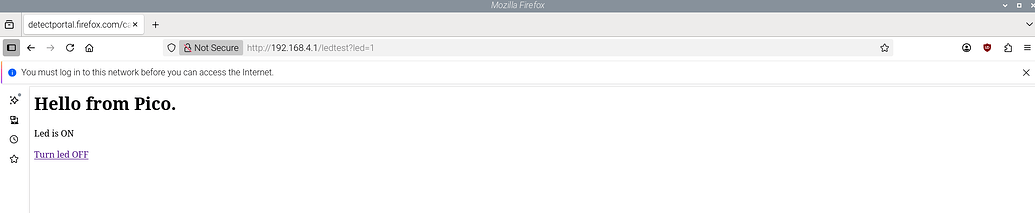
Repita cuantas veces sea necesario, y se demuestra como se controla el LED verde de la Raspberry Pico 2 W vía su “wireless access point” (similar a un mini router) desde el cliente que se conecta va el “browser”. Otras Raspberry Pico 2 W se pueden conectar vía este método de “wireless access point” sin tener que usar un “router” en el medio. En este caso, el cliente que usa HTTP está directamente conectado a la Raspberry Pico 2 W vía WiFi. También otros “wireless access poiints” se pueden crear solamente cambiando el nombre y el contraseña si es necesario, como por ejemplo así como se muestra a continuación en el código en C,
    const char *ap_name = "picow_test1";
    const char *password = "password";
La Raspberry Pico 2 W está disponible en DigiKey. Que tenga un buen día.

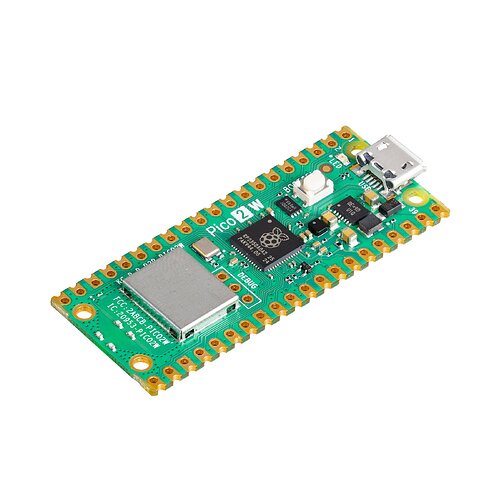
SC1633 | DigiKey Electronics
Order today, ships today. SC1633 – CYW43439, RP2350 - Transceiver; 802.11 b/g/n (Wi-Fi, WiFi, WLAN), Bluetooth® 5.x (BLE) 2.4GHz Evaluation Board from Raspberry Pi. Pricing and Availability on millions of electronic components from Digi-Key…
This article is available in english here.
Este artículo está disponible en inglés aquí.