


리눅스 환경에서 라즈베리 파이 피코 2에 Zephyr OS를 설치하는 방법을 이전 게시글에 설명해 두었으니, 이번 내용을 진행하기에 앞서 해당 글을 따라 해주시기 바랍니다. 이번 게시글에서는 Zephyr OS 환경에서 라즈베리 파이 피코 2에 Qwiic을 지원하는 SparkFun의 ICM-20948 MEMS 센서 평가 기판을 연동해 보겠습니다.
이제, minicom을 통해 Zephyr OS 쉘을 사용할 것입니다. 첫 번째 단계로 Zephyr OS 쉘을 빌드합니다. 아래와 같이 Zephyr OS 쉘을 포함하도록 라즈베리 파이 피코 2를 빌드하고 플래시합니다.
(venv) $ west build -p always -b rpi_pico2/rp2350a/m33 -S cdc-acm-console ../samples/sensor/sensor_shell -DCONFIG_USB_DEVICE_INITIALIZE_AT_BOOT=y -DCONFIG_SENSOR_INFO=y -DCONFIG_I2C_SHELL=y -DCONFIG_I2C=y
.....
.....


(venv) $west flash --runner uf2
-- west flash: rebuilding
ninja: no work to do.
-- west flash: using runner uf2
-- runners.uf2: Copying UF2 file to '/media/digikey/RP2350'
빌드 및 플래시가 완료되면, minicom 세션을 시작합니다.
$ minicom -D /dev/ttyACM0

Welcome to minicom 2.8

OPTIONS: I18n
Port /dev/ttyACM0, 12:41:43

.....
[00:00:01.211,000] <inf> usbd_ch9: Handle control 0x200061cc ep 0x80, len 0, s:0 d:0 s:1
[00:00:01.211,000] <inf> usbd_ch9: s-(out)-status finished
uart:~$
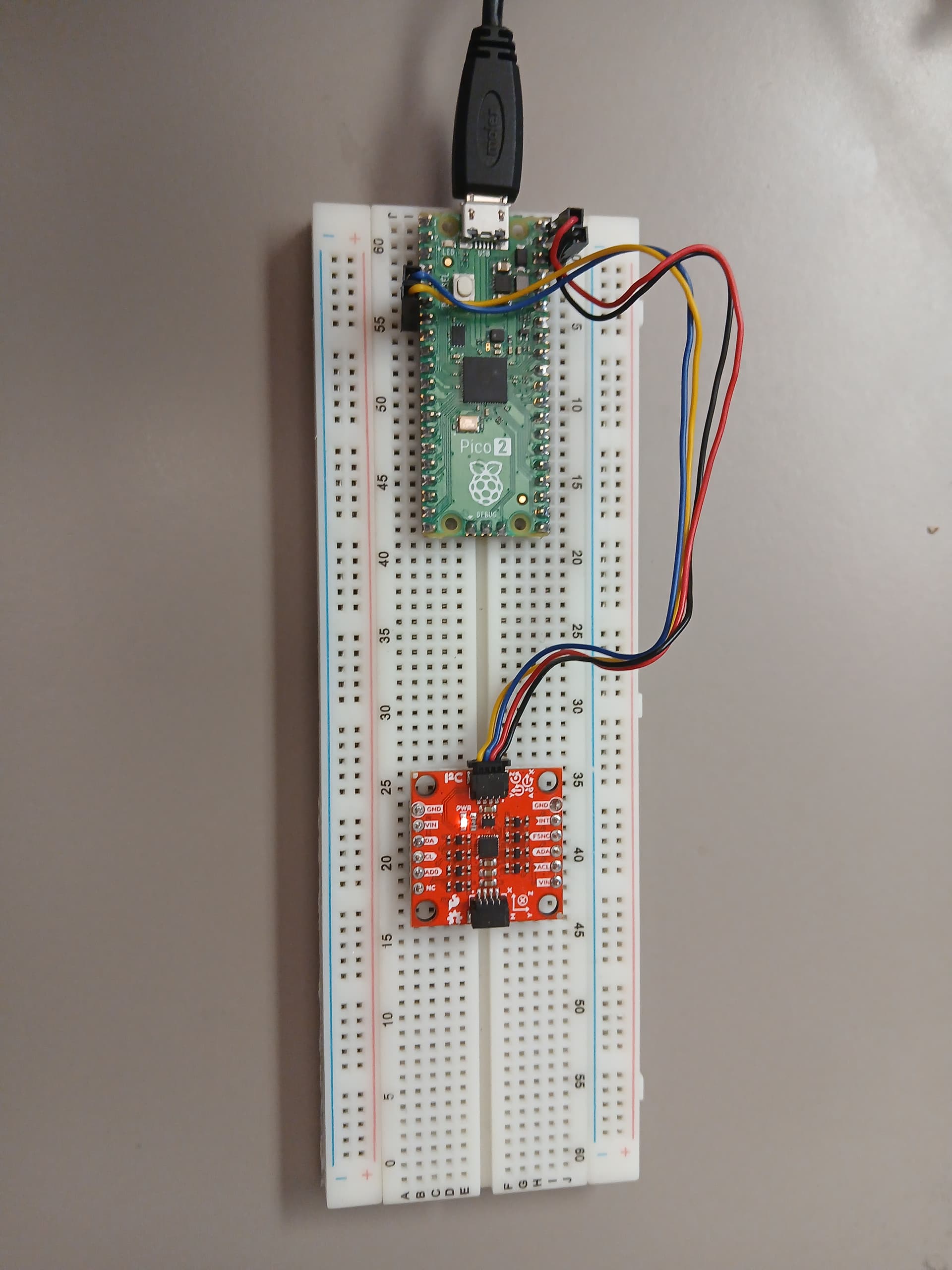
Zephyr OS 초기화 과정에서 몇 가지 메시지가 출력된 뒤, Zephyr OS 쉘 프롬프트 uart:~$가 표시될 것입니다. 이제 라즈베리 파이 피코 2의 I2C 인터페이스를 사용하여 ICM-20948 MEMS 센서 평가 기판과 연결합니다. 다음 그림은 디지키에서 구매 가능한 평가용 브레드보드에 QWIIC 케이블을 사용하여 라즈베리 파이 피코 2를 센서 평가 기판과 I2C로 연결한 모습을 보여줍니다.
다음과 같이 라즈베리 파이 피코 2의 I2C 인터페이스를 스캔하여, 사용 가능한 I2C 포트를 먼저 식별합니다.
uart:~$ i2c scan
scan: wrong parameter count
scan - Scan I2C devices
       Usage: scan <device>
Subcommands:
  i2c@40098000
  i2c@40090000
그러면, Zephyr OS 쉘을 사용하는 라즈베리 파이 피코 2는 연결된 인터페이스에 따라 장치를 감지할 것입니다. 본 예제에서는 ICM-20948 MEMS 센서 평가 기판이 i2c@4009000 인터페이스에 연결되어 있습니다. I2C 버스에서 ICM-20948 MEMS 센서 평가 기판의 I2C 슬레이브 주소를 자동으로 감지하기 위해 다음 명령을 실행하면, 버스에 연결된 모든 I2C 슬레이브 주소를 스캔할 것입니다.
uart:~$ i2c scan i2c@40090000
     0  1  2  3  4  5  6  7  8  9  a  b  c  d  e  f
00:             -- -- -- -- -- -- -- -- -- -- -- --
10: -- -- -- -- -- -- -- -- -- -- -- -- -- -- -- --
20: -- -- -- -- -- -- -- -- -- -- -- -- -- -- -- --
30: -- -- -- -- -- -- -- -- -- -- -- -- -- -- -- --
40: -- -- -- -- -- -- -- -- -- -- -- -- -- -- -- --
50: -- -- -- -- -- -- -- -- -- -- -- -- -- -- -- --
60: -- -- -- -- -- -- -- -- -- 69 -- -- -- -- -- --
70: -- -- -- -- -- -- -- --
1 devices found on i2c@40090000
ICM-20948 MEMS 센서 평가 기판의 I2C 슬레이브 주소는 0x69로 정상적으로 감지되었습니다. 이제 I2C 인터페이스를 사용하여 ICM-20948 MEMS 센서 평가 기판의 WHO_AM_I 레지스터 (0x00)를 아래와 같이 읽어봅니다.
uart:~$ i2c read_byte i2c@40090000 0x69 0x00
Output: 0xea
라즈베리 파이 피코 2에서 실행 중인 Zephyr OS 쉘에서 ICM-20948의 WHO_AM_I 값은 올바르게 0xEA로 확인되었습니다. 다음으로, ICM-20948의 LP_CONFIG 레지스터 (0x05)를 아래와 같이 읽어봅니다.
uart:~$ i2c read_byte i2c@40090000 0x69 0x05
Output: 0x40
저전력 사이클 모드가 활성화되어 있으므로, 아래와 같이 저전력 기능을 비활성화합니다.
uart:~$ i2c write_byte i2c@40090000 0x69 0x06 0x00
uart:~$ i2c read_byte i2c@40090000 0x69 0x06
Output: 0x0
지금까지, ICM-20948와 I2C 통신을 수행하기 위한 방법을 확인하였습니다. 이제 가상 센서를 사용하여 Zephyr OS 쉘에서 센서를 이름으로 참조하는 방식을 설명하겠습니다.
(venv) $ west build -p always -b rpi_pico2/rp2350a/m33 -S cdc-acm-console ../samples/sensor/sensor_shell -DCONFIG_USB_DEVICE_INITIALIZE_AT_BOOT=y -DCONFIG_SENSOR_INFO=y -DCONFIG_I2C_SHELL=y -DCONFIG_I2C=y -DCONFIG_SENSOR_INFO=y -DEXTRA_DTC_OVERLAY_FILE=fake_sensor.overlay

(venv) $ west flash --runner uf2
이후 minicom을 통해 가상 센서가 등록되었는지 확인합니다.
uart:~$ sensor info
device name: sensor@0, vendor: A stand-in for a real vendor which can be used in examples and tests, model: fake-sensor, friendly name: Fake sensor 0
device name: sensor@1, vendor: A stand-in for a real vendor which can be used in examples and tests, model: fake-sensor, friendly name: Fake sensor 1
만약 sensor@0을 사용한다면, 아래 명령을 실행합니다.
uart:~$ sensor get sensor@0
channel type=0(accel_x) index=0 shift=7 num_samples=1 value=46582103665ns (0.000000)
channel type=1(accel_y) index=0 shift=7 num_samples=1 value=46582103665ns (1.000000)
channel type=2(accel_z) index=0 shift=7 num_samples=1 value=46582103665ns (2.000000)
channel type=3(accel_xyz) index=0 shift=7 num_samples=1 value=46582103665ns, (0.000000, 1.000000, 2.000000)
channel type=4(gyro_x) index=0 shift=7 num_samples=1 value=46582103665ns (4.000000)
channel type=5(gyro_y) index=0 shift=7 num_samples=1 value=46582103665ns (5.000000)
channel type=6(gyro_z) index=0 shift=7 num_samples=1 value=46582103665ns (6.000000)
channel type=7(gyro_xyz) index=0 shift=7 num_samples=1 value=46582103665ns, (4.000000, 5.000000, 6.000000)
channel type=8(magn_x) index=0 shift=7 num_samples=1 value=46582103665ns (8.000000)
channel type=9(magn_y) index=0 shift=7 num_samples=1 value=46582103665ns (9.000000)
channel type=10(magn_z) index=0 shift=7 num_samples=1 value=46582103665ns (10.000000)
channel type=11(magn_xyz) index=0 shift=7 num_samples=1 value=46582103665ns, (8.000000, 9.000000, 10.000000)
channel type=12(die_temp) index=0 shift=7 num_samples=1 value=46582103665ns (12.000000)
channel type=13(ambient_temp) index=0 shift=7 num_samples=1 value=46582103665ns (13.000000)
channel type=14(press) index=0 shift=7 num_samples=1 value=46582103665ns (14.000000)
channel type=15(prox) index=0 num_samples=1 value=46850604664ns (is_near = 0)
channel type=16(humidity) index=0 shift=7 num_samples=1 value=46582103665ns (16.000000)
channel type=17(light) index=0 shift=7 num_samples=1 value=46582103665ns (17.000000)
channel type=18(ir) index=0 shift=7 num_samples=1 value=46582103665ns (18.000000)
channel type=19(red) index=0 shift=7 num_samples=1 value=46582103665ns (19.000000)
channel type=20(green) index=0 shift=7 num_samples=1 value=46582103665ns (20.000000)
channel type=21(blue) index=0 shift=7 num_samples=1 value=46582103665ns (21.000000)
channel type=22(altitude) index=0 shift=7 num_samples=1 value=46582103665ns (22.000000)
channel type=23(pm_1_0) index=0 shift=7 num_samples=1 value=46582103665ns (23.000000)
channel type=24(pm_2_5) index=0 shift=7 num_samples=1 value=46582103665ns (24.000000)
channel type=25(pm_10) index=0 shift=7 num_samples=1 value=46582103665ns (25.000000)
channel type=26(distance) index=0 shift=7 num_samples=1 value=46582103665ns (26.000000)
channel type=27(co2) index=0 shift=7 num_samples=1 value=46582103665ns (27.000000)
channel type=28(o2) index=0 shift=7 num_samples=1 value=46582103665ns (28.000000)
channel type=29(voc) index=0 shift=7 num_samples=1 value=46582103665ns (29.000000)
channel type=30(gas_resistance) index=0 shift=7 num_samples=1 value=46582103665ns (30.000000)
channel type=31(flow_rate) index=0 shift=7 num_samples=1 value=46582103665ns (31.000000)
channel type=32(voltage) index=0 shift=7 num_samples=1 value=46582103665ns (32.000000)
channel type=33(vshunt) index=0 shift=7 num_samples=1 value=46582103665ns (33.000000)
channel type=34(current) index=0 shift=7 num_samples=1 value=46582103665ns (34.000000)
channel type=35(power) index=0 shift=7 num_samples=1 value=46582103665ns (35.000000)
channel type=36(resistance) index=0 shift=7 num_samples=1 value=46582103665ns (36.000000)
channel type=37(rotation) index=0 shift=7 num_samples=1 value=46582103665ns (37.000000)
channel type=38(pos_dx) index=0 shift=7 num_samples=1 value=46582103665ns (38.000000)
channel type=39(pos_dy) index=0 shift=7 num_samples=1 value=46582103665ns (39.000000)
channel type=40(pos_dz) index=0 shift=7 num_samples=1 value=46582103665ns (40.000000)
channel type=41(pos_dxyz) index=0 shift=7 num_samples=1 value=46582103665ns, (38.000000, 39.000000, 40.000000)
channel type=42(rpm) index=0 shift=7 num_samples=1 value=46582103665ns (42.000000)
channel type=43(frequency) index=0 shift=7 num_samples=1 value=46582103665ns (43.000000)
channel type=44(gauge_voltage) index=0 shift=7 num_samples=1 value=46582103665ns (44.000000)
channel type=45(gauge_avg_current) index=0 shift=7 num_samples=1 value=46582103665ns (45.000000)
channel type=46(gauge_stdby_current) index=0 shift=7 num_samples=1 value=46582103665ns (46.000000)
channel type=47(gauge_max_load_current) index=0 shift=7 num_samples=1 value=46582103665ns (47.000000)
channel type=48(gauge_temp) index=0 shift=7 num_samples=1 value=46582103665ns (48.000000)
channel type=49(gauge_state_of_charge) index=0 shift=7 num_samples=1 value=46582103665ns (49.000000)
channel type=50(gauge_full_cap) index=0 shift=7 num_samples=1 value=46582103665ns (50.000000)
channel type=51(gauge_remaining_cap) index=0 shift=7 num_samples=1 value=46582103665ns (51.000000)
channel type=52(gauge_nominal_cap) index=0 shift=7 num_samples=1 value=46582103665ns (52.000000)
channel type=53(gauge_full_avail_cap) index=0 shift=7 num_samples=1 value=46582103665ns (53.000000)
channel type=54(gauge_avg_power) index=0 shift=7 num_samples=1 value=46582103665ns (54.000000)
channel type=55(gauge_state_of_health) index=0 shift=7 num_samples=1 value=46582103665ns (55.000000)
channel type=56(gauge_time_to_empty) index=0 shift=7 num_samples=1 value=46582103665ns (56.000000)
channel type=57(gauge_time_to_full) index=0 shift=7 num_samples=1 value=46582103665ns (57.000000)
channel type=58(gauge_cycle_count) index=0 shift=7 num_samples=1 value=46582103665ns (58.000000)
channel type=59(gauge_design_voltage) index=0 shift=7 num_samples=1 value=46582103665ns (59.000000)
channel type=60(gauge_desired_voltage) index=0 shift=7 num_samples=1 value=46582103665ns (60.000000)
channel type=61(gauge_desired_charging_current) index=0 shift=7 num_samples=1 value=46582103665ns (61.000000)
channel type=62(game_rotation_vector) index=0 shift=7 num_samples=1 value=46582103665ns (62.000000)
channel type=63(gravity_vector) index=0 shift=7 num_samples=1 value=46582103665ns (63.000000)
channel type=64(gbias_xyz) index=0 shift=7 num_samples=1 value=46582103665ns (64.000000)
특정 파라미터만 필요한 경우, 아래와 같이 원하는 항목만 필터링할 수 있습니다.
uart:~$ sensor get sensor@1 accel_z current
channel type=2(accel_z) index=0 shift=6 num_samples=1 value=94184102299ns (2.000000)
channel type=34(current) index=0 shift=6 num_samples=1 value=94184102299ns (34.000000)
영문 원본: Zephyr OS on Raspberry Pico 2 I2C interface to SPARKFUN 9DOF IMU (Linux) Part 2