


In the previous article the installation of Zephyr Os on the raspberry Pico 2 (Linux) Part 1 was described, please follow that first, in order to perform the next steps. Here the Raspberry Pico 2 will be integrated to the TDK ICM 20984 MEMS Sensor Qwiic Platform Evaluation Expansion Board from Sparkfun in Zephyr OS.
At this point we will be using the Zephyr OS shell via minicom. The first step is to build the Zephyr OS shell. Proceed to build and flash the Raspberry Pico 2 with the Zephyr OS shell as shown below,
(venv) $ west build -p always -b rpi_pico2/rp2350a/m33 -S cdc-acm-console ../samples/sensor/sensor_shell -DCONFIG_USB_DEVICE_INITIALIZE_AT_BOOT=y -DCONFIG_SENSOR_INFO=y -DCONFIG_I2C_SHELL=y -DCONFIG_I2C=y
.....
.....


(venv) $west flash --runner uf2
-- west flash: rebuilding
ninja: no work to do.
-- west flash: using runner uf2
-- runners.uf2: Copying UF2 file to '/media/digikey/RP2350'
Now start the minicom session,
$ minicom -D /dev/ttyACM0

Welcome to minicom 2.8

OPTIONS: I18n
Port /dev/ttyACM0, 12:41:43

.....
[00:00:01.211,000] <inf> usbd_ch9: Handle control 0x200061cc ep 0x80, len 0, s:0 d:0 s:1
[00:00:01.211,000] <inf> usbd_ch9: s-(out)-status finished
uart:~$
The Zephyr OS shell uart~$ eventually shows up after some messages from the Zephyr OS initialization process. Now use the I2C interface in the Raspberry Pico 2 to connect to the TDK ICM 20984 MEMS Sensor Qwiic Platform Evaluation Expansion Board from Sparkfun. The next picture shows how the Rapsberry pico 2 is connected to the sensor via I2C in an evaluation bread board available from DigiKey and also Qwiic using these cables.
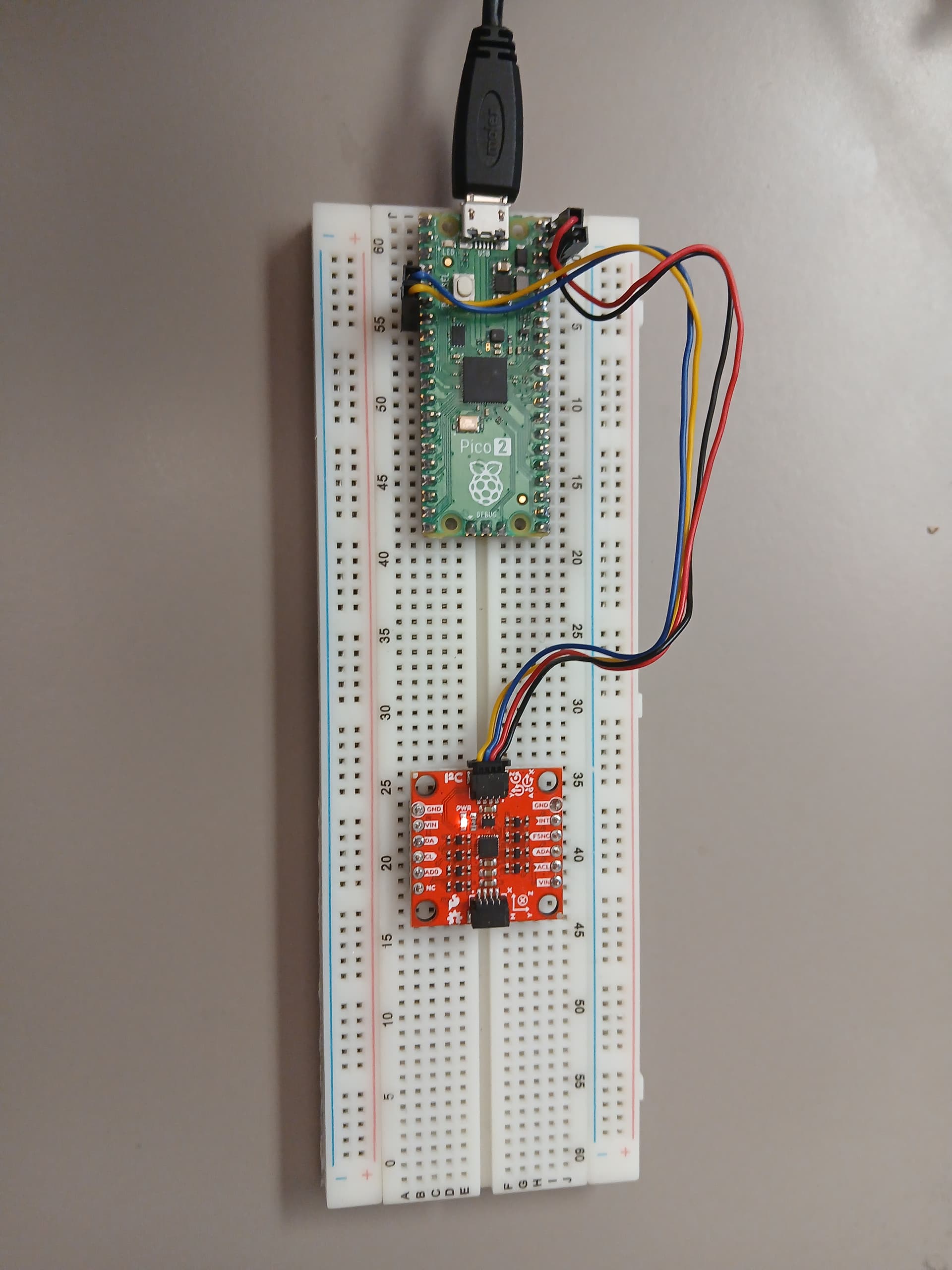
Proceed to scan the I2C interfaces in the Raspberry Pico 2 as follows, first identify the I2C ports,
uart:~$ i2c scan
scan: wrong parameter count
scan - Scan I2C devices
       Usage: scan <device>
Subcommands:
  i2c@40098000
  i2c@40090000
At this point the Raspberry Pico 2 using Zephyr OS shell will detect the device depending on which interface is connected. In this case the TDK ICM 20984 MEMS Sensor Qwiic Platform Evaluation Expansion Board from Sparkfun is connected to the i2c@4009000 interface. In order to autodetect the slave I2c address of the TDK ICM-20984 Sensor Qwiic Platform Evaluation Expansion Board. in the I2C bus issue the following command and it will scan all the possible I2C slave addresses on the bus,
uart:~$ i2c scan i2c@40090000
     0  1  2  3  4  5  6  7  8  9  a  b  c  d  e  f
00:             -- -- -- -- -- -- -- -- -- -- -- --
10: -- -- -- -- -- -- -- -- -- -- -- -- -- -- -- --
20: -- -- -- -- -- -- -- -- -- -- -- -- -- -- -- --
30: -- -- -- -- -- -- -- -- -- -- -- -- -- -- -- --
40: -- -- -- -- -- -- -- -- -- -- -- -- -- -- -- --
50: -- -- -- -- -- -- -- -- -- -- -- -- -- -- -- --
60: -- -- -- -- -- -- -- -- -- 69 -- -- -- -- -- --
70: -- -- -- -- -- -- -- --
1 devices found on i2c@40090000
The TDK ICM 20984 MEMS Sensor Qwiic Platform Evaluation Expansion Board from Sparkfun with the I2C slave address is detected properly as 0x69. Now use the I2C interface to read the WHOAMI register of the TDK ICM 20984 MEMS Sensor Qwiic Platform Evaluation Expansion Board from Sparkfun as follows,
uart:~$ i2c read_byte i2c@40090000 0x69 0x00
Output: 0xea
The correct value for the ICM-20948 in the Zephyr OS shell running in the Raspberry Pico 2 is received as 0xEA. Now proceed to read the low power feature inside the ASIC as follows,
uart:~$ i2c read_byte i2c@40090000 0x69 0x05
Output: 0x40
As is currently enabled, proceed to disable the low power feature as follows,
uart:~$ i2c write_byte i2c@40090000 0x69 0x06 0x00
uart:~$ i2c read_byte i2c@40090000 0x69 0x06
Output: 0x0
At this point it has been shown how to coordinate the I2C transactions with the ASIC. A fake sensor can be used to show the way a sensor is referenced in Zephyr OS shell,
(venv) $ west build -p always -b rpi_pico2/rp2350a/m33 -S cdc-acm-console ../samples/sensor/sensor_shell -DCONFIG_USB_DEVICE_INITIALIZE_AT_BOOT=y -DCONFIG_SENSOR_INFO=y -DCONFIG_I2C_SHELL=y -DCONFIG_I2C=y -DCONFIG_SENSOR_INFO=y -DEXTRA_DTC_OVERLAY_FILE=fake_sensor.overlay

(venv) $ west flash --runner uf2
then use minicom to find the fake sensor as follows,
uart:~$ sensor info
device name: sensor@0, vendor: A stand-in for a real vendor which can be used in examples and tests, model: fake-sensor, friendly name: Fake sensor 0
device name: sensor@1, vendor: A stand-in for a real vendor which can be used in examples and tests, model: fake-sensor, friendly name: Fake sensor 1
if sensor@0 is used then issue the following command,
uart:~$ sensor get sensor@0
channel type=0(accel_x) index=0 shift=7 num_samples=1 value=46582103665ns (0.000000)
channel type=1(accel_y) index=0 shift=7 num_samples=1 value=46582103665ns (1.000000)
channel type=2(accel_z) index=0 shift=7 num_samples=1 value=46582103665ns (2.000000)
channel type=3(accel_xyz) index=0 shift=7 num_samples=1 value=46582103665ns, (0.000000, 1.000000, 2.000000)
channel type=4(gyro_x) index=0 shift=7 num_samples=1 value=46582103665ns (4.000000)
channel type=5(gyro_y) index=0 shift=7 num_samples=1 value=46582103665ns (5.000000)
channel type=6(gyro_z) index=0 shift=7 num_samples=1 value=46582103665ns (6.000000)
channel type=7(gyro_xyz) index=0 shift=7 num_samples=1 value=46582103665ns, (4.000000, 5.000000, 6.000000)
channel type=8(magn_x) index=0 shift=7 num_samples=1 value=46582103665ns (8.000000)
channel type=9(magn_y) index=0 shift=7 num_samples=1 value=46582103665ns (9.000000)
channel type=10(magn_z) index=0 shift=7 num_samples=1 value=46582103665ns (10.000000)
channel type=11(magn_xyz) index=0 shift=7 num_samples=1 value=46582103665ns, (8.000000, 9.000000, 10.000000)
channel type=12(die_temp) index=0 shift=7 num_samples=1 value=46582103665ns (12.000000)
channel type=13(ambient_temp) index=0 shift=7 num_samples=1 value=46582103665ns (13.000000)
channel type=14(press) index=0 shift=7 num_samples=1 value=46582103665ns (14.000000)
channel type=15(prox) index=0 num_samples=1 value=46850604664ns (is_near = 0)
channel type=16(humidity) index=0 shift=7 num_samples=1 value=46582103665ns (16.000000)
channel type=17(light) index=0 shift=7 num_samples=1 value=46582103665ns (17.000000)
channel type=18(ir) index=0 shift=7 num_samples=1 value=46582103665ns (18.000000)
channel type=19(red) index=0 shift=7 num_samples=1 value=46582103665ns (19.000000)
channel type=20(green) index=0 shift=7 num_samples=1 value=46582103665ns (20.000000)
channel type=21(blue) index=0 shift=7 num_samples=1 value=46582103665ns (21.000000)
channel type=22(altitude) index=0 shift=7 num_samples=1 value=46582103665ns (22.000000)
channel type=23(pm_1_0) index=0 shift=7 num_samples=1 value=46582103665ns (23.000000)
channel type=24(pm_2_5) index=0 shift=7 num_samples=1 value=46582103665ns (24.000000)
channel type=25(pm_10) index=0 shift=7 num_samples=1 value=46582103665ns (25.000000)
channel type=26(distance) index=0 shift=7 num_samples=1 value=46582103665ns (26.000000)
channel type=27(co2) index=0 shift=7 num_samples=1 value=46582103665ns (27.000000)
channel type=28(o2) index=0 shift=7 num_samples=1 value=46582103665ns (28.000000)
channel type=29(voc) index=0 shift=7 num_samples=1 value=46582103665ns (29.000000)
channel type=30(gas_resistance) index=0 shift=7 num_samples=1 value=46582103665ns (30.000000)
channel type=31(flow_rate) index=0 shift=7 num_samples=1 value=46582103665ns (31.000000)
channel type=32(voltage) index=0 shift=7 num_samples=1 value=46582103665ns (32.000000)
channel type=33(vshunt) index=0 shift=7 num_samples=1 value=46582103665ns (33.000000)
channel type=34(current) index=0 shift=7 num_samples=1 value=46582103665ns (34.000000)
channel type=35(power) index=0 shift=7 num_samples=1 value=46582103665ns (35.000000)
channel type=36(resistance) index=0 shift=7 num_samples=1 value=46582103665ns (36.000000)
channel type=37(rotation) index=0 shift=7 num_samples=1 value=46582103665ns (37.000000)
channel type=38(pos_dx) index=0 shift=7 num_samples=1 value=46582103665ns (38.000000)
channel type=39(pos_dy) index=0 shift=7 num_samples=1 value=46582103665ns (39.000000)
channel type=40(pos_dz) index=0 shift=7 num_samples=1 value=46582103665ns (40.000000)
channel type=41(pos_dxyz) index=0 shift=7 num_samples=1 value=46582103665ns, (38.000000, 39.000000, 40.000000)
channel type=42(rpm) index=0 shift=7 num_samples=1 value=46582103665ns (42.000000)
channel type=43(frequency) index=0 shift=7 num_samples=1 value=46582103665ns (43.000000)
channel type=44(gauge_voltage) index=0 shift=7 num_samples=1 value=46582103665ns (44.000000)
channel type=45(gauge_avg_current) index=0 shift=7 num_samples=1 value=46582103665ns (45.000000)
channel type=46(gauge_stdby_current) index=0 shift=7 num_samples=1 value=46582103665ns (46.000000)
channel type=47(gauge_max_load_current) index=0 shift=7 num_samples=1 value=46582103665ns (47.000000)
channel type=48(gauge_temp) index=0 shift=7 num_samples=1 value=46582103665ns (48.000000)
channel type=49(gauge_state_of_charge) index=0 shift=7 num_samples=1 value=46582103665ns (49.000000)
channel type=50(gauge_full_cap) index=0 shift=7 num_samples=1 value=46582103665ns (50.000000)
channel type=51(gauge_remaining_cap) index=0 shift=7 num_samples=1 value=46582103665ns (51.000000)
channel type=52(gauge_nominal_cap) index=0 shift=7 num_samples=1 value=46582103665ns (52.000000)
channel type=53(gauge_full_avail_cap) index=0 shift=7 num_samples=1 value=46582103665ns (53.000000)
channel type=54(gauge_avg_power) index=0 shift=7 num_samples=1 value=46582103665ns (54.000000)
channel type=55(gauge_state_of_health) index=0 shift=7 num_samples=1 value=46582103665ns (55.000000)
channel type=56(gauge_time_to_empty) index=0 shift=7 num_samples=1 value=46582103665ns (56.000000)
channel type=57(gauge_time_to_full) index=0 shift=7 num_samples=1 value=46582103665ns (57.000000)
channel type=58(gauge_cycle_count) index=0 shift=7 num_samples=1 value=46582103665ns (58.000000)
channel type=59(gauge_design_voltage) index=0 shift=7 num_samples=1 value=46582103665ns (59.000000)
channel type=60(gauge_desired_voltage) index=0 shift=7 num_samples=1 value=46582103665ns (60.000000)
channel type=61(gauge_desired_charging_current) index=0 shift=7 num_samples=1 value=46582103665ns (61.000000)
channel type=62(game_rotation_vector) index=0 shift=7 num_samples=1 value=46582103665ns (62.000000)
channel type=63(gravity_vector) index=0 shift=7 num_samples=1 value=46582103665ns (63.000000)
channel type=64(gbias_xyz) index=0 shift=7 num_samples=1 value=46582103665ns (64.000000)
if only certain parameters are needed they can be filtered as follows,
uart:~$ sensor get sensor@1 accel_z current
channel type=2(accel_z) index=0 shift=6 num_samples=1 value=94184102299ns (2.000000)
channel type=34(current) index=0 shift=6 num_samples=1 value=94184102299ns (34.000000)
This article is also available in spanish language here.
Este artículo esta disponible en lenguaje español aqui.